How to Revive Dead Leads in Your CRM
How to Revive Dead Leads in Your CRM
Last updated: June 1, 2026
Quick answer
Dead leads in your CRM can become new pipeline if you re-engage them with the right timing, context, and automation.
The best way to revive old CRM leads is to segment them by history, enrich missing data, track buying signals, and run reactivation campaigns based on demo drop-offs, closed-lost reasons, job changes, budget timing, company growth, or renewed interest.
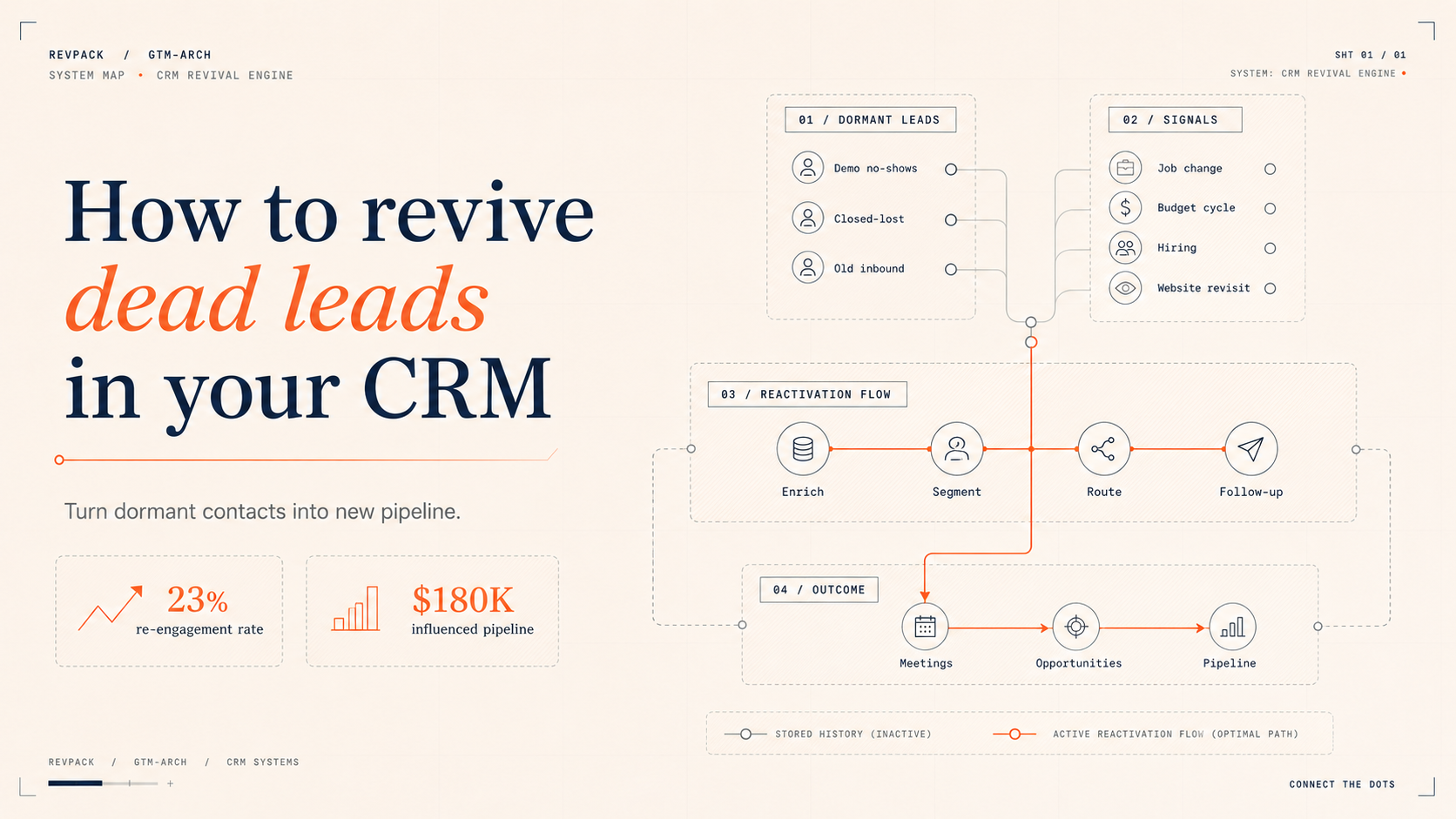
For one B2B SaaS client, RevPack helped reactivate 400+ dormant leads from the previous 18 months. The result was a 23% re-engagement rate, 8 new sales opportunities, and $180K in influenced pipeline.
Best for
This guide is for B2B SaaS, tech, agency, and RevOps teams that have old demo requests, closed-lost deals, inactive contacts, or stale CRM records they want to turn back into pipeline.
RevPack angle
RevPack helps B2B teams clean CRM data, enrich dormant leads, build reactivation workflows, track job changes, automate follow-up, and connect the full system across HubSpot, Salesforce, Clay, Make, Zapier, LinkedIn Sales Navigator, and revenue dashboards.
Why dead leads are usually not dead
Every company has old leads sitting quietly in the CRM.
Some booked a demo and disappeared.
Some said the timing was wrong.
Some had no budget.
Some chose another vendor.
Some changed jobs.
Some filled out a form and never made it to a call.
Most teams treat these leads as dead.
That is usually a mistake.
Many of these people already know your brand, understand the problem, and fit your target market. They are often warmer than a cold lead you would generate from scratch.
The issue is not always interest.
Often, the issue is timing.
That is why CRM reactivation works. You are reaching back out to people who already showed intent and giving them a relevant reason to re-engage.
What is CRM lead reactivation?
CRM lead reactivation is the process of identifying old leads, segmenting them by context, and re-engaging them with relevant follow-up campaigns.
The goal is to turn stale CRM records into new conversations, meetings, opportunities, and pipeline.
A good reactivation system usually includes:
- CRM cleanup
- Lead segmentation
- Closed-lost reason tracking
- Demo drop-off tracking
- Job change monitoring
- Company growth signals
- Enrichment
- Follow-up automation
- Lead routing
- Revenue reporting
This turns your CRM from a passive database into an active pipeline source.
Which old leads should you reactivate?
Not every old lead deserves the same follow-up.
Start with the segments that already showed intent.
Best CRM segments for reactivation
SegmentWhy it mattersBest follow-up angleDemo no-showsThey showed intent but never had the conversationOffer to reschedule with a clearer agendaDemo completed, no next stepThey understood the offer but pausedAsk if priorities have changedClosed-lost due to timingThe problem may still existFollow up after 3, 6, or 9 monthsClosed-lost due to budgetBudget may reset quarterly or annuallyShare ROI proof or a smaller starting optionClosed-lost to competitorThe competitor may not have worked outAsk if they are still happy with their current setupOld inbound leadsThey showed interest but never convertedSend useful, problem-specific contentPast championsThey know your product or serviceTrack job changes and re-engage after a moveStale CRM contactsThey may have new roles, tools, or company contextEnrich and rescore before outreach
The strongest reactivation campaigns usually start with demo history and closed-lost reasons.
That is where the context is richest.
Why your CRM is one of your best lead sources
Most companies spend most of their energy generating new leads.
That makes sense, but it often means they ignore the leads they already paid to acquire.
Your CRM already contains people who:
- Know your brand
- Understand your category
- Fit your target market
- Expressed interest in the past
- Had a problem you may be able to solve
- Spoke with your team
- Visited your site
- Downloaded content
- Booked or considered booking a demo
That is valuable.
A cold outbound list usually starts from zero trust.
A reactivation list starts with history.
That history gives you better context, better timing, and a more natural reason to reach out.
The 3 essential CRM reactivation campaigns
1. Demo drop-off reactivation
Many prospects go quiet after booking or attending a demo.
That does not always mean they are not interested.
Sometimes:
- The timing was wrong
- The internal project got delayed
- The buyer had no budget yet
- The champion got busy
- Another priority took over
- They needed approval from leadership
- They were comparing vendors
A simple reactivation flow can bring these leads back.
Example flow
For demo drop-offs, create follow-ups at:
- 30 days
- 90 days
- 180 days
- 270 days
Each message should reference the original context.
Example:
We spoke a few months ago about improving your CRM data and lead routing. At the time, timing was not ideal. Has this become a priority again, or should I check back later?
This is much better than sending a generic “just checking in” email.
2. Closed-lost reason reactivation
Closed-lost reasons are one of the most useful data points in your CRM.
They tell you why someone did not buy.
That means they also tell you when and how to follow up.
Common closed-lost reasons and reactivation angles
Closed-lost reasonReactivation timingFollow-up angleNo budgetNext quarter or next budget cycleShare ROI, smaller package, or phased rolloutBad timing3–6 months laterAsk if the original project is active againInternal priorityAfter expected project endAsk if bandwidth has opened upChose competitor3–6 months laterAsk how the current solution is workingMissing featureAfter product/service updateMention what changedNo decision60–90 days laterReopen the business problemToo small / too earlyAfter growth signalReference hiring, funding, or team growth
This is where CRM data becomes powerful.
If your team logs the reason properly, your follow-up can feel relevant instead of random.
3. Job change reactivation
Job changes are one of the strongest reactivation triggers.
If someone previously liked your product or service and moves to a new company, they may be able to bring you into that new environment.
You are not starting from scratch.
They already know you.
A job change campaign can monitor previous demo contacts, closed-lost champions, customers, and past buyers.
When one of them changes companies, you can reach out with a simple message:
Saw you moved to [Company]. Congrats on the new role. We worked together when you were at [Previous Company], and I thought it might be useful to reconnect once you settle in.
This works especially well when the person had a positive experience with your team.
What CRM data do you need for reactivation?
CRM reactivation does not require perfect data.
But it does require a few core fields.
Minimum CRM fields to track
You should track:
- Lead source
- Lifecycle stage
- Last contacted date
- Last meeting date
- Demo status
- Closed-lost reason
- Main objection
- Product or service interest
- Company size
- CRM owner
- Next follow-up date
- Current tool or vendor
- Contact LinkedIn URL
- Company LinkedIn URL
Useful optional fields
If you want stronger reactivation campaigns, also track:
- Budget timing
- Buying committee
- Decision timeline
- Competitor mentioned
- Pain point
- Use case
- Tool stack
- Hiring signals
- Funding signals
- Company growth signals
- Previous email engagement
- Website visits
The more context you store, the more relevant your reactivation can be.
Why clean CRM data matters
CRM reactivation fails when the data is messy.
If closed-lost reasons are missing, every follow-up becomes generic.
If contacts are duplicated, people get messaged twice.
If lifecycle stages are wrong, leads enter the wrong workflow.
If ownership is unclear, nobody knows who should follow up.
If last-contacted dates are missing, teams reach out too soon or too late.
That is why reactivation starts with CRM cleanup.
Before building automation, make sure your CRM can answer:
- Who booked a demo?
- Who attended a demo?
- Who no-showed?
- Who went closed-lost?
- Why did they go closed-lost?
- Who has not been contacted in 90+ days?
- Which old contacts changed jobs?
- Which accounts now show new buying signals?
- Which leads should sales contact first?
Once your CRM can answer these questions, automation becomes much easier.
How automation makes reactivation scalable
Manual follow-up rarely happens consistently.
Sales teams are busy.
Old leads get forgotten.
Job changes go unnoticed.
Closed-lost deals stay closed forever.
Automation fixes that.
The goal is to build conditional workflows that react to lead history and new signals.
Example automation rules
You can create workflows like:
- If lead no-showed a demo, send a reschedule sequence
- If lead went closed-lost due to timing, create a follow-up task in 90 days
- If lead went closed-lost due to budget, trigger a quarterly budget refresh email
- If previous champion changes jobs, create a sales task
- If company raises funding, add account to a reactivation campaign
- If company starts hiring sales roles, send a growth-focused message
- If old lead visits the website again, alert the account owner
- If old contact engages with an email, push them to sales
This turns reactivation into a system instead of a memory exercise.
Tools for CRM lead reactivation
You can build CRM reactivation systems with tools your team may already use.
Common tools
ToolUse caseHubSpotCRM, workflows, lifecycle stages, lead scoring, reportingSalesforceCRM, opportunity tracking, sales tasks, reportingClayEnrichment, signal detection, job changes, account researchLinkedIn Sales NavigatorJob change alerts and account monitoringMakeWorkflow automation and system connectionsZapierSimple workflow automationCrunchbaseFunding and company growth signalsApolloContact data and outbound workflowsGoogle SheetsLightweight tracking and QAGA4Website and conversion behaviorSlackSales alerts and internal notifications
You do not need all of these.
A simple first version can be built with CRM fields, a few lists, and basic follow-up workflows.
Real client example: reactivating 400+ dormant leads
One B2B SaaS client had more than 400 dormant leads in their CRM from the previous 18 months.
These leads came from demo requests, old conversations, and closed-lost opportunities.
The problem was not lead volume.
The problem was that nobody had a clean system to re-engage them.
What we implemented
Month 1: Reactivation sequences by closed-lost reason
We segmented dormant leads based on why they did not move forward.
Then we created follow-up sequences for the most common reasons:
- Bad timing
- No budget
- No decision
- Internal priority
- Demo completed, no next step
Month 2: Job change monitoring
We added job change monitoring for 150+ previous contacts.
When a past contact moved to a new company, the sales team received a task with suggested outreach.
Month 3: Growth-triggered campaigns
We added company growth signals, including hiring and other expansion indicators.
When an old account showed new growth activity, it became eligible for a reactivation campaign.
Results
The campaign produced:
- 23% dormant lead re-engagement
- 8 new sales opportunities
- $180K in influenced pipeline
The most important lesson:
The leads were already there.
The missing piece was the system.
The reactivation campaign checklist
Use this checklist to build your first CRM reactivation system.
Step 1: Pull dormant leads
Create lists of:
- Demo no-shows
- Demo completed, no next step
- Closed-lost opportunities
- Old inbound leads
- Old trial users
- Unworked contacts
- Past champions
- Old contacts who recently engaged again
Step 2: Clean the data
Check:
- Duplicate contacts
- Missing emails
- Missing company names
- Missing lifecycle stages
- Missing closed-lost reasons
- Incorrect owners
- Bad phone or email data
- Outdated company information
Step 3: Segment by context
Group leads by:
- Last interaction
- Closed-lost reason
- Product interest
- Company size
- Industry
- Geography
- Original source
- Time since last contact
- Previous objection
Step 4: Enrich and rescore
Update:
- Current job title
- Current company
- Company size
- Funding
- Hiring
- Tech stack
- LinkedIn URLs
- Website
- Email validity
- Fit score
Step 5: Build reactivation workflows
Create workflows for:
- Timing check-ins
- Budget refreshes
- Job changes
- Competitor check-ins
- Growth triggers
- Website revisit alerts
- Old demo follow-ups
Step 6: Route to sales
Make sure every qualified lead has:
- Owner
- Next step
- Follow-up task
- Source
- Campaign name
- Reason for reactivation
Step 7: Track revenue impact
Measure:
- Re-engaged leads
- Replies
- Meetings booked
- Qualified opportunities
- Pipeline created
- Closed revenue
- Best-performing segments
- Best-performing triggers
Example reactivation campaigns
Timing check-in
Best for leads who said the timing was wrong.
Send after 3, 6, or 9 months.
Message angle:
Last time we spoke, timing was the main blocker. Has this become more relevant for the team now, or should I check back later?
Budget refresh
Best for leads who said there was no budget.
Send around quarterly or annual planning periods.
Message angle:
When we last spoke, budget was the blocker. If this is coming back into planning, happy to share a smaller starting option or ROI case study.
Job-change champion tracker
Best for previous champions, demo contacts, and customer contacts.
Send after they move to a new company.
Message angle:
Congrats on the new role. Since we already spoke about [problem] at [old company], I thought it may be useful to reconnect once you settle in.
Competitor check-in
Best for leads who chose another vendor.
Send after 3–6 months.
Message angle:
Last time we spoke, you were moving forward with another option. Curious how that has been working and whether the original problem is fully solved.
Renewed interest alert
Best for old leads who visit your website, open emails, or interact with content again.
Message angle:
Saw there may be renewed interest around [topic]. Is this something your team is looking at again?
Common mistakes with CRM reactivation
Mistake 1: Sending generic “just checking in” emails
Old leads need context.
Mention the original problem, timing, objection, or trigger.
Mistake 2: Not tracking closed-lost reasons
If you do not know why someone did not buy, it is hard to follow up well.
Add a required closed-lost reason field in your CRM.
Mistake 3: Reactivating everyone the same way
A demo no-show, closed-lost opportunity, and past champion should not get the same message.
Segment before sending.
Mistake 4: Ignoring job changes
A past champion moving to a new company is one of the best reactivation opportunities.
Track it.
Mistake 5: Measuring replies only
Replies matter, but pipeline matters more.
Track meetings, qualified opportunities, pipeline, and closed revenue.
FAQ
What is a dead lead in CRM?
A dead lead is a contact or account that previously showed interest but has gone inactive. This can include old demo requests, no-shows, closed-lost opportunities, stale inbound leads, old trial users, and contacts who stopped responding.
How do you revive dead leads?
You revive dead leads by segmenting them by history, enriching their current data, identifying new buying signals, and sending relevant follow-up based on timing, budget, job changes, company growth, or previous objections.
When should you follow up with closed-lost leads?
A good starting point is 3, 6, and 9 months after the original conversation. For budget-related losses, quarterly or annual planning periods can work well. For job changes or growth signals, follow up when the signal appears.
What is the best CRM reactivation campaign?
One of the best CRM reactivation campaigns is job-change tracking for previous champions or demo contacts. If someone who already knows your product or service moves to a new company, they may be open to reconnecting.
What tools can help with CRM reactivation?
Common tools include HubSpot, Salesforce, Clay, LinkedIn Sales Navigator, Make, Zapier, Apollo, Crunchbase, GA4, and Slack. These tools can help with segmentation, enrichment, signal tracking, workflows, routing, and reporting.
Why does CRM data quality matter for reactivation?
CRM data quality matters because reactivation depends on context. If closed-lost reasons, lifecycle stages, objections, owners, and last-contacted dates are missing, follow-up becomes generic and harder to automate.
How can RevPack help revive dead leads?
RevPack helps B2B teams audit CRM data, identify dormant opportunities, enrich old records, build reactivation workflows, track job changes, automate follow-up, route qualified leads, and measure pipeline created from old leads.
Final takeaway
Your CRM is probably holding more pipeline than you think.
Old demos, no-shows, closed-lost deals, stale inbound leads, and past champions are often easier to revive than brand-new cold leads.
They already know your brand.
They already showed interest.
They already had some level of need.
The missing piece is usually the system.
Clean the data.
Segment the leads.
Track the right signals.
Automate the follow-up.
Measure pipeline, not just replies.
That is how you turn old CRM records into a renewable pipeline source.