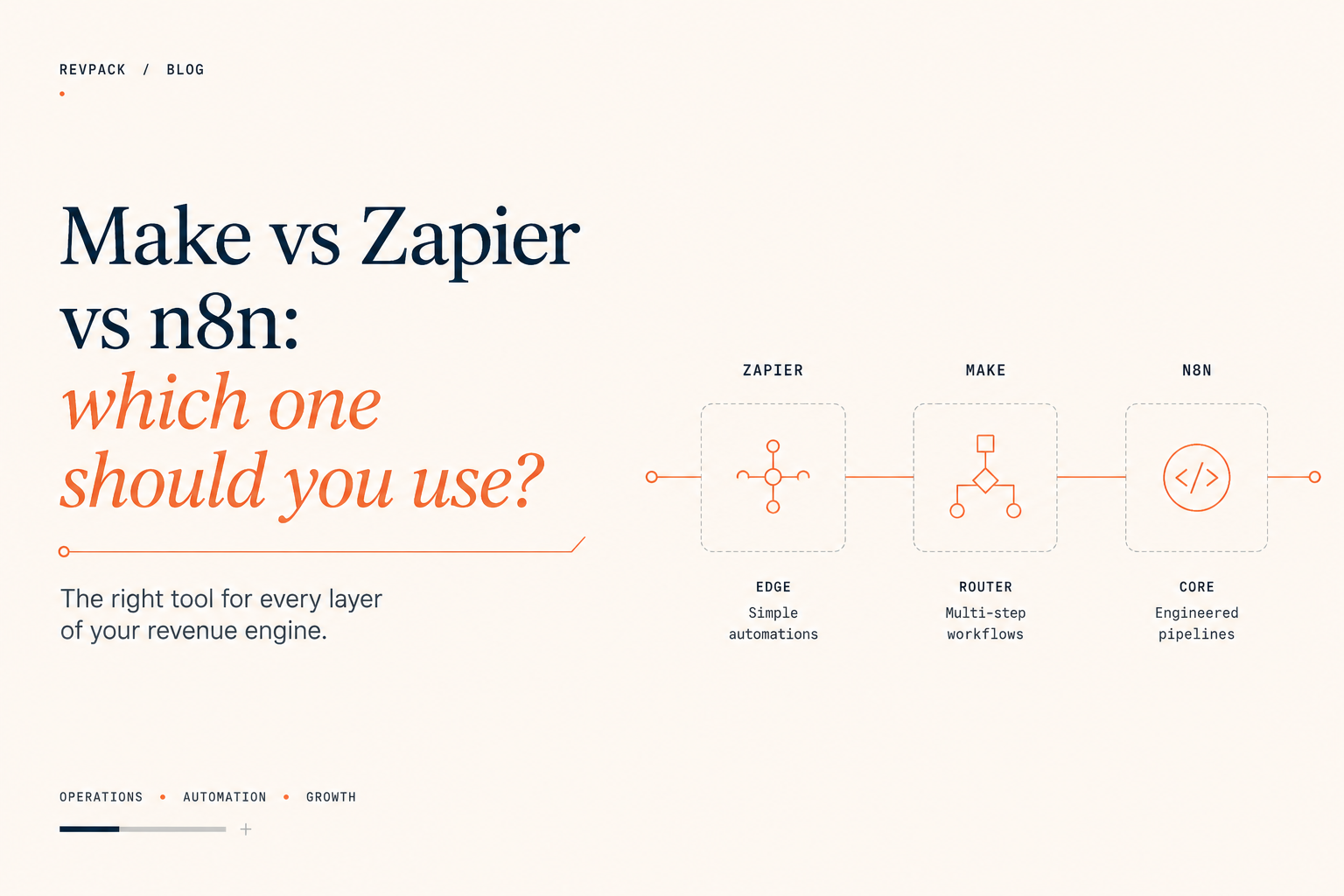
Make vs Zapier vs n8n: which one should you use?
TL;DR
Wrong question. The teams that run operations well don't pick one of these; they run all three, each owning the layer it's built for. Zapier is the edge: simple, self-serve automations for marketing, sales, and ops people who shouldn't need an engineer. Make is the router: multi-step CRM syncs and reporting logic owned by RevOps. n8n is the core: engineered, version-controlled, mission-critical pipelines and AI agents, owned by engineers. Two things decide where any given workflow belongs: what it costs you when it fails, and who needs to own it day to day. Pick per workflow, not per company.
What the research shows
The case for automating operations is not subtle. Smartsheet's survey of information workers found more than 40% spend at least a quarter of their workweek on manual, repetitive tasks, led by data entry and data collection. A UiPath office-worker survey put the waste at about 4.5 hours a week on tasks people believe could be automated. ProcessMaker's process-intelligence research found office workers spend roughly 10% of their time on manual data entry into business systems like the CRM and ERP. The prize is real, and it's why iPaaS tools are now core operations infrastructure rather than a convenience.
The catch is that the platform you choose quietly shapes the architecture you'll build. In the comparison this post draws on, each tool bills on a different metric, and the metric is a design constraint: Zapier charges per task, which penalizes deep, careful workflows; Make charges per operation, which penalizes high-frequency polling; n8n charges per execution, which makes thoroughness free but invites monolithic workflows that are hard to maintain. And the headline integration count matters less than it looks: roughly 80% of non-trivial workflows end up calling a raw API endpoint rather than a prebuilt connector. So the real decision isn't "which has the most integrations." It's which tool fits the workflow's complexity, owner, and cost of failure.
The pricing model is a design constraint
Ignore the sticker prices for a minute and look at what each platform bills for. The billing metric isn't only a cost line. It's a constraint that shapes every workflow you build, whether you notice it or not.
Zapier bills per task: every individual action a workflow takes. A 10-step Zap that fires 20,000 times a month is 200,000 tasks, and the bill climbs fast. The second-order effect is the part the comparisons skip: Zapier punishes depth. Add an enrichment step, a validation step, a logging step, and you've added cost to every run. So architects build shallow. Zaps stay short and skip the error-checking, because the pricing makes thoroughness expensive. Fine for a two-step handoff. A problem the moment you want a workflow to be careful.
Make bills per operation: each module that fires inside a scenario. More volume for the money than Zapier, and with a different bias. It punishes high-frequency polling. A scenario that checks an API every minute burns operations all day even when nothing has changed, so Make pushes you toward webhook-triggered automations that fire only when there's something to do. Read that as the platform telling you what it's for: event-driven routing, not constant watching.
n8n bills per execution: the whole workflow run counts once, no matter how many steps are inside it. A 2-step sync and a 200-step agent pipeline cost the same: one. This flips the incentive. Error handling, logging, branching, and retries all cost nothing, so you're free to build workflows that are careful. The trap is the opposite of Zapier's: because steps are free, n8n invites sprawling, monolithic franken-workflows that do everything and become impossible to hand off or debug. Self-hosted, the licensing is zero and you pay only for a server, sometimes a few dollars a month, though you take on the maintenance, which is a real cost we'll come back to.
Three billing models, three architectures pushed on you by default. Shallow and fast. Event-driven and moderate. Deep and careful, with a hoarding problem. That is most of the layering decision already.
Cost of failure draws the same line
The other thing that decides where a workflow belongs is what happens when it breaks, and more to the point what it costs you when it does.
A nightly enrichment job fails quietly? You log it and rerun it in the morning. No harm. A CRM write fails, or an outbound payment trigger misfires? You need to know immediately, replay from the exact point of failure, and put a human in the loop. The three platforms handle failure at the three levels you'd expect.
Zapier's failure model is thin. If a step fails and you haven't attached a handler, the Zap stops. Attach a handler and it disables automatic replay, so now you're retrying by hand. It notifies and does simple fallbacks, and that's the ceiling. Acceptable for low-stakes edge automations. Not where you put anything you can't afford to lose.
Make is meaningfully better. You attach an error handler to any module and tell it what to do (break, retry, ignore, or commit), and it can park a failed run's state and let you replay from the point it broke once the upstream API recovers. For a RevOps team running CRM syncs and reporting rollups, replay-from-failure is the feature that lets you sleep.
n8n handles failure the way engineers expect software to. It has a Try/Catch equivalent and global error workflows: one workflow whose only job is to catch, log, and remediate failures from every other pipeline in the instance. It does programmatic backoff on retries, item-level error handling inside a batch, and node-level logs showing the exact state of every variable at the millisecond it failed. That is what you need for mission-critical, regulated, or money-moving pipelines, and it is overkill for syncing form fills to a spreadsheet.
So the layers assign themselves
Put the pricing logic and the failure logic together and the stack falls into three layers on its own. Add a third axis, who can safely own the workflow, and the boundaries sharpen.
Zapier is the edge. Hand it to marketing, sales, and HR. Its design abstracts the JSON away so a non-technical operator can connect two SaaS tools and ship a working automation in fifteen minutes without filing a ticket. That is its real value: it takes the trivial, high-volume "sync this form to that sheet" requests off the engineering team's plate and lets the people closest to the problem build the simple things themselves. Keep it shallow and low-stakes, because that is what the pricing and the failure model are built for.
Make is the router. Hand it to RevOps and BizOps. It exposes enough of the data to build real routing logic, including parallel branches, array iteration, and aggregation, without demanding a software engineer, and its visual canvas is strong for debugging: a failed run highlights the exact module that broke and lets you inspect the data going in and out. This is where most CRM synchronization lives. It is where we built Deviniti's trial routing: a Make scenario that pulls 500–1,200 Jira Marketplace trials a month into HubSpot, enriches each one before a rep sees it, and routes the high-value accounts into outreach that went on to hit an 8% reply rate. None of that needed n8n. It needed a tool that does multidirectional routing well and can be owned by an operations team, which is what Make is.
n8n is the core. Hand it to engineers, and only engineers. It exposes raw JSON at every step, runs Node.js and Python in code nodes, and makes raw HTTP calls against any API with proper auth. The part that matters most for production: native Git integration, with real development, staging, and production environments tied to branches. Neither Zapier nor Make has anything close, so on those platforms one errant click by a non-technical user can sever a live pipeline, and your only recovery is a visual rollback or a blueprint you remembered to export. n8n is also where AI agent orchestration belongs now: recursive tool-use loops, conversational memory, and retrieval pipelines a linear builder cannot express. This is the central nervous system: bulk enrichment, sensitive database writes, anything that needs version control and an audit trail. It is the most powerful of the three and the most expensive to own, which is exactly why you don't let the whole company build in it.
The connector count is a red herring
One myth to kill before it drives the decision: the connector count. Zapier's headline number, north of 8,000 integrations against Make's couple thousand and n8n's few hundred, sounds decisive and mostly isn't. In practice roughly 80% of non-trivial workflows end up calling a raw HTTP endpoint anyway, because the thing you need either isn't a prebuilt connector or the connector doesn't expose the field you want. On raw HTTP and webhooks, Make and n8n are far stronger than Zapier. So the connector library is a genuine convenience at the edge, where Zapier belongs, and close to irrelevant in the routing and core layers, where you are hitting APIs directly. Don't let the biggest number on the table pick your architecture.
The tools, side by side
| Zapier | Make | n8n | |
|---|---|---|---|
| Billing model | Per task (every action) | Per operation (every module) | Per execution (whole run = 1) |
| Best owner | Marketing, sales, HR | RevOps, BizOps | Engineers only |
| Branching & iteration | Limited (Paths); no parallel | Routers, Iterator, Aggregator | IF / Switch, Split In Batches, code |
| Error handling | Basic; halts on failure | Error handler; replay from failure | Try/Catch; global error workflows |
| Custom API / HTTP | Limited | Strong (native HTTP module) | Strongest (HTTP node, code, full auth) |
| Git / environments | None | None (60-day visual rollback) | Native Git; dev / staging / prod |
| Best-fit layer | Edge | Router | Core |
The real work is the seams
Once you run all three, the failure mode changes. It stops being "we picked the wrong tool" and becomes "a workflow ended up in the wrong layer and no one noticed." The classic version: a marketer builds a quick Zap to route leads, it works, the business comes to depend on it, and eighteen months later that fifteen-minute edge automation is quietly load-bearing, with no error handling, no version control, and no one who remembers how it works. Right for a prototype, wrong for production, and nothing flagged the promotion.
So the governance lives at the seams, not inside any one tool. Decide who is allowed to build where. Decide what makes a workflow graduate from Zapier to Make, or from Make to n8n. Usually that is the moment its failure starts to cost real money, or its logic outgrows what a visual router can hold. And watch the handoffs between tools, because that is where data quietly gets dropped or duplicated when one platform's idea of a record doesn't match the next one's. The layering only works if someone owns the boundaries between the layers. That is the job: not choosing a tool, but running the system the tools add up to.
How to route a workflow before you build it
When a new automation request lands, place it before you build it. Two questions settle most cases. What does it cost you when this fails at 2 a.m. with no one watching? If the honest answer is "not much," it can live at the edge in Zapier. If it is "a deal, a payment, or a number leadership trusts," it belongs in n8n with real error handling and version control, however simple it looks today. And who needs to own it day to day? If an operations person should be able to change the routing without an engineer, that is Make. If changing it safely means understanding the code and the schema, that is the core.
The simple, the moderate, and the critical each have a home. The mistake is building everything in your favorite tool and meeting the constraint later, when the Zapier bill arrives or the unversioned n8n monolith breaks and no one can read it.
The question was never which platform is best. Each is the best at one thing and a liability at the others. The skill isn't the choice. It is keeping every workflow in the layer that matches what it costs you when it breaks.
FAQ
Can't I just standardize on one tool? You can, and it breaks one of two ways. All-Zapier means high-volume work gets expensive and fragile. All-n8n means engineering becomes a bottleneck for trivial requests marketing could handle itself. Layering avoids both.
Is self-hosting n8n really free? The Community Edition license is $0, and a small instance can run on a cheap server. But you own the maintenance, including patching, updates, monitoring, and credential rotation, and the enterprise features like SSO and Git sit on paid tiers. Free software, real operating cost.
Which is cheapest at scale? It depends on how your workflows behave, because the billing metric differs. Deep multi-step workflows at volume punish Zapier's per-task model; high-frequency polling punishes Make's per-operation model; n8n's per-execution model is usually the most predictable for complex pipelines, especially self-hosted.
When should a workflow move from Zapier to Make, or Make to n8n? When its failure starts to cost real money, or its logic outgrows what a visual router can hold. A workflow that was right as a quick prototype is wrong once the business depends on it without error handling or version control.
Does Zapier's 8,000-plus integrations make it the safe default? For simple SaaS-to-SaaS connections at the edge, yes. For routing and core work, no. Most complex workflows hit raw APIs anyway, where Make and n8n are stronger. Don't let the biggest number on the comparison table pick your architecture.
Which is best for AI agents? n8n. Recursive tool-use loops, conversational memory, and retrieval pipelines need the raw control a linear builder can't express, which is why agentic workflows have largely landed there.
Smartsheet — survey of information workers; more than 40% spend at least a quarter of their week on manual, repetitive tasks. https://www.smartsheet.com/content-center/product-news/automation/workers-waste-quarter-work-week-manual-repetitive-tasks
UiPath — Office Worker Survey; ~4.5 hours a week wasted on automatable tasks. https://www.uipath.com/newsroom/new-study-finds-majority-of-global-office-workers-crushed-by-repetitive-tasks
ProcessMaker — process-intelligence research; office workers spend ~10% of time on manual data entry into business systems. https://www.processmaker.com/blog/repetitive-tasks-at-work-research-and-statistics-2024/
Platform capabilities, pricing models, and performance figures drawn from the Zapier / Make / n8n architecture analysis provided internally.