From Shallow Prompts to Smart Workflows: How to 1000x Your Prospect Research
From Shallow Prompts to Smart AI Workflows
Last updated: June 1, 2026
Quick answer
If you use ChatGPT for prospect research with prompts like “research this company,” you will usually get generic results.
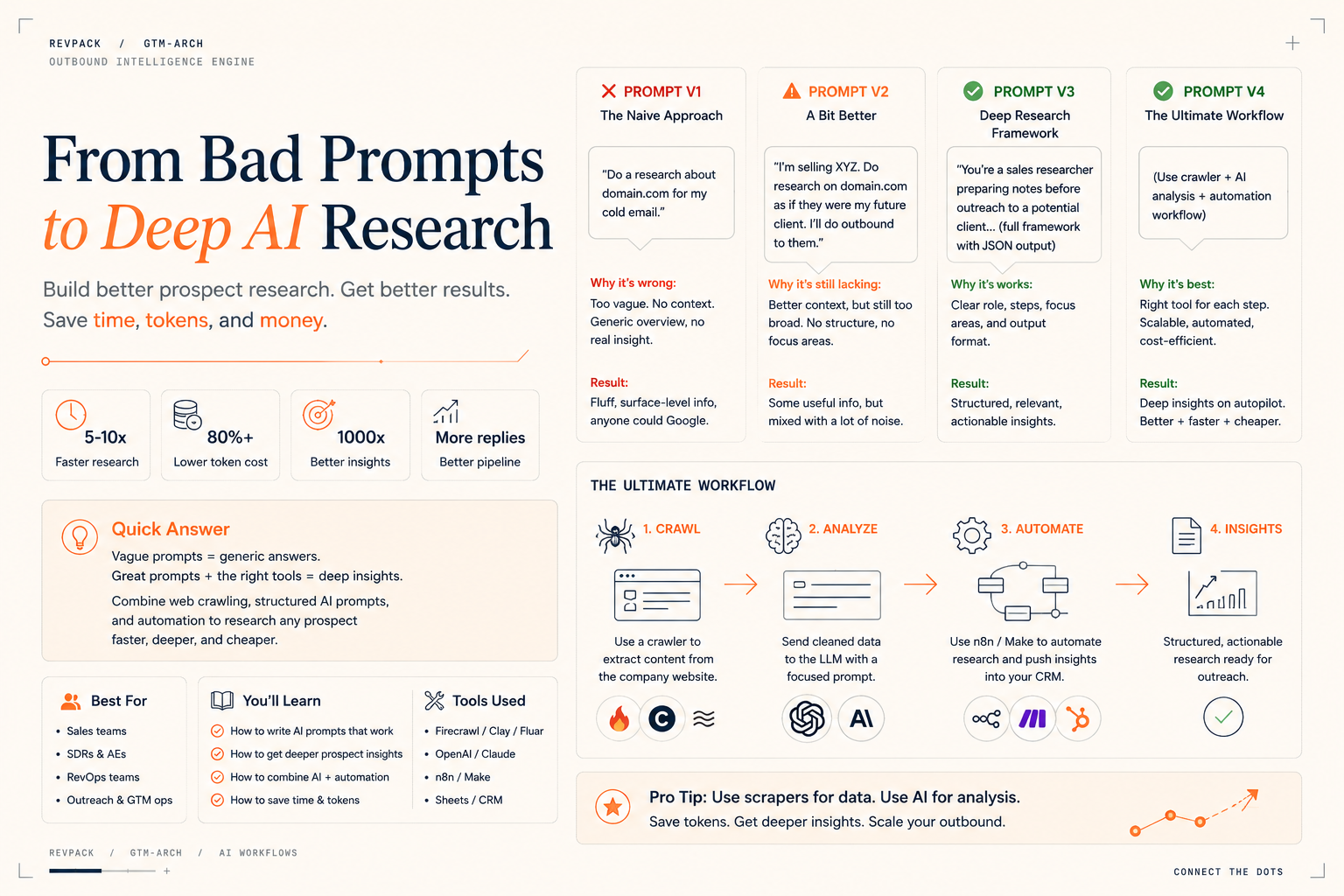
A better setup is simple: collect the right company data first, then use AI to analyze it. Scrapers, APIs, and enrichment tools collect facts. The LLM turns those facts into sales insights, buying signals, and outreach angles.
That is how you move from shallow prompts to useful GTM workflows.
Best for
This guide is for sales, RevOps, and GTM teams that want better prospect research, better outbound personalization, and less manual research.
RevPack angle
RevPack helps teams build AI-powered GTM workflows using Clay, Firecrawl, Make, n8n, Zapier, HubSpot, Apollo, OpenAI, and enrichment tools.
Why most AI prospect research is bad
A lot of people start with a prompt like:
Do research on this company for my cold email.
The result is usually weak.
You get a basic company summary, a few public facts, and maybe one awkward personalization line. It sounds fine, but it does not help sales.
The problem is the prompt is too vague.
AI needs context. It needs to know what you sell, who you sell to, what signals matter, and what kind of output you want.
Without that, it guesses.
And when it guesses, the research gets fluffy.
Prompt v1: the bad version
The first version usually looks like this:
Do research about domain.com for my cold email.
This does not work well because the AI has no direction.
It does not know:
- What you sell
- Who your ICP is
- What problems to look for
- What buying signals matter
- How the research should be formatted
A vague prompt creates vague research.
Prompt v2: adding some context
A slightly better version looks like this:
I’m selling XYZ. Do research on domain.com as if they were a future client.
This is better because the AI knows what you sell.
But it is still too broad.
If you sell RevOps services, should it look for HubSpot usage, hiring signals, CRM issues, outbound motion, sales team growth, or messy reporting?
You need to tell it what matters.
Prompt v3: the structured research prompt
A better prompt gives the AI a clear job.
Example:
You are a sales researcher preparing notes before outbound.
Research domain.com and look for signals related to XYZ.
Focus on company context, possible pain points, hiring signals, tool usage, strategic changes, and reasons they may need XYZ.
Return the answer in this format:
- Company description
- Relevant signals
- Possible need for XYZ
- Evidence
- Suggested outreach angle
- Confidence level
This works much better because the AI has structure.
It knows what to look for.
It knows what to ignore.
It gives you something a sales rep can actually use.
Why prompts are still not enough
A strong prompt helps, but it does not solve the full problem.
If you ask the LLM to browse a whole website, read every page, filter the content, and analyze everything, it can get slow and expensive.
You are using AI for too much of the job.
Prospect research has two parts:
- Collecting data
- Understanding what the data means
AI is best at the second part.
For the first part, use tools that are faster and cheaper.
The better workflow
The better setup has three steps.
1. Collect the data
Use tools like Clay, Firecrawl, Apollo, BuiltWith, LinkedIn Sales Navigator, Crunchbase, Make, or n8n to collect company data.
Useful data can include:
- Website copy
- Product pages
- Pricing pages
- Careers pages
- Blog posts
- Funding data
- Tech stack
- LinkedIn data
- CRM history
- Previous engagement
The goal is to collect useful facts before asking AI to analyze them.
2. Use AI to analyze it
Once the data is collected, send it to the LLM.
Ask it to find:
- ICP fit
- Buying signals
- Pain points
- Growth signals
- Hiring signals
- Tool usage
- Relevant outreach angles
This is where AI becomes useful.
It connects the dots.
Our GPT lead qualification template uses the same pattern.
3. Push the output into your workflow
The final step is automation.
The research should not stay in a ChatGPT window.
Push it into:
- HubSpot
- Salesforce
- Clay
- Apollo
- A sales brief
- A Slack alert
- An outbound sequence
That makes the research useful for the team.
Example: hiring signal research
Let’s say you want to know if a company is growing its sales team.
A bad prompt would be:
Research this company and tell me if they are growing.
A better workflow would:
- Crawl the careers page
- Extract open roles
- Group roles by department
- Send the job data to AI
- Ask AI what the hiring pattern suggests
- Push the insight into HubSpot or Clay
If a company is hiring multiple SDRs, that may signal a need for better outbound systems, lead routing, enrichment, CRM workflows, and reporting.
The crawler collects the facts.
The AI explains why those facts matter.
Old way vs better way
AreaOld wayBetter wayResearchManual or one-off ChatGPT promptAutomated workflowData collectionRep checks websites manuallyCrawlers and enrichment toolsAI usageGeneric summariesSignal analysisOutputLong notesStructured fieldsCRM syncUsually missingSaved into HubSpot, Salesforce, or ClayScaleHard to repeatRuns on many accounts
What a good AI research output includes
A useful output should be short and structured.
Use fields like:
- Company name
- Website
- Company description
- ICP fit
- Relevant signals
- Evidence
- Possible pain points
- Suggested outreach angle
- Confidence level
- Recommended next step
Example:
{
  "company": "Example SaaS",
  "icp_fit": "High",
  "signals": [
    "Hiring 3 SDRs",
    "Uses HubSpot",
    "Recently launched a new integration"
  ],
  "possible_need": "The company may need better lead routing and outbound workflows as the sales team grows.",
  "outreach_angle": "Mention their SDR hiring and ask if they are already building the CRM workflow to support new outbound volume.",
  "confidence": "Medium"
}
This is much easier to use than a long research paragraph.
Common mistakes
Asking vague prompts
“Research this company” is too broad.
Give the AI a role, goal, context, and output format.
Using AI for basic data collection
Use crawlers, APIs, and enrichment tools to collect facts.
Use AI to analyze the facts.
Writing long outputs nobody uses
Sales reps need short, structured insights.
They do not need a full essay.
Keeping research outside the CRM
If the insight stays in ChatGPT, it disappears.
Put it into your CRM, Clay table, sales brief, or outbound workflow.
Focusing on clever personalization
A clever first line is nice.
A real business reason to reach out is better.
FAQ
How do you use AI for prospect research?
Collect company data first, then use AI to analyze it. The AI should identify ICP fit, buying signals, possible pain points, and outreach angles.
What is the best prompt for prospect research?
The best prompt gives the AI a role, goal, context, process, and output format. It should explain what you sell and what signals matter.
Should AI crawl websites?
Sometimes, but it is usually better to use a crawler or scraper first. Then use AI to analyze the collected data.
What tools can help?
Useful tools include Clay, Firecrawl, Make, n8n, Zapier, HubSpot, Apollo, LinkedIn Sales Navigator, Crunchbase, BuiltWith, and OpenAI.
What should the output look like?
Keep it structured. Include company description, ICP fit, relevant signals, evidence, possible need, outreach angle, and confidence level.
How can RevPack help?
RevPack helps B2B teams build AI prospect research workflows that collect data, analyze signals, sync insights to CRM, and support better outbound.
Final takeaway
Better AI prospect research does not come from a magic prompt.
It comes from a better workflow.
Collect the right data.
Use AI to understand it.
Save the output where your sales team works.
Track which signals create replies, meetings, and pipeline.
That is how you turn shallow prompts into smart GTM workflows.