Enterprise HubSpot Implementation: Migration, Architecture, Cost & Rollout
Last updated: 6 October 2026. Every HubSpot price, limit and feature tier in this guide was checked against HubSpot's own pricing pages, product catalog and knowledge base on that date.
Enterprise HubSpot implementation is not a CRM setup project. Once you have several teams, regions, integrations and years of legacy data, it becomes a redesign of your revenue architecture: the data model, which system owns which data, the processes HubSpot encodes, and the habits of the people who have to use it every day.
Configuring HubSpot is the easy part. This guide covers the hard part: whether you should move at all, what the architecture should look like, how migration really works, what it costs in 2026, how long it takes and why so many implementations disappoint. It also includes three free tools: a complexity score, a Salesforce stay-or-go check and a year-one cost calculator.
Where this comes from: HubSpot's public documentation and price list, published partner pricing, named customer cases (each labeled with who reported it), independent research from BCG, McKinsey and Gartner, and what we see running HubSpot implementations and migrations as a HubSpot Platinum Solutions Partner. Boxes marked "Illustrative scenario" are composite examples built from common patterns. They do not describe a specific client.
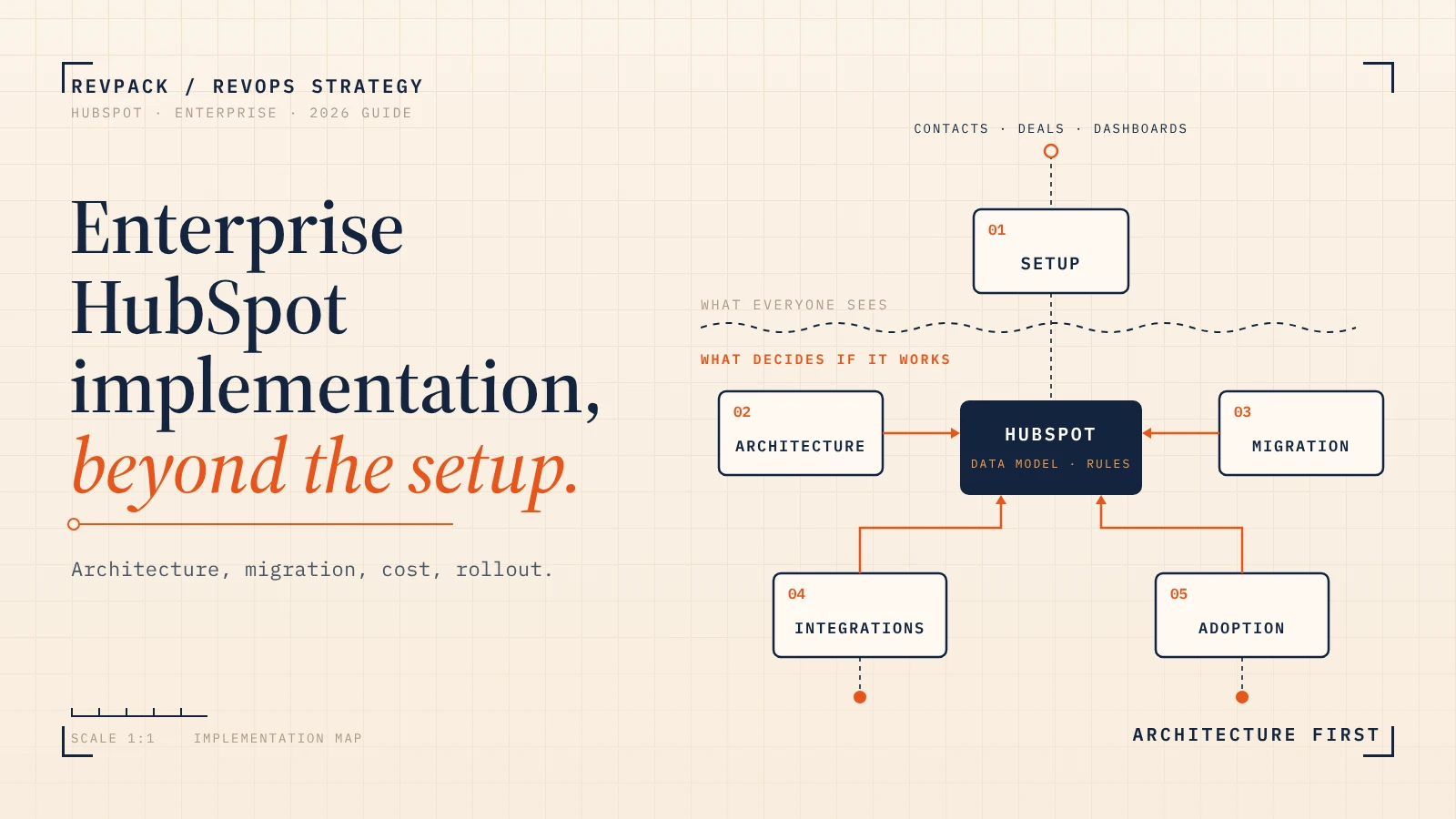
Figure 1. The implementation iceberg. Most quotes, demos and onboarding plans only cover the tip.
Free tool · 60 seconds · no email
How complex would your HubSpot implementation be?
Answer 10 questions. You get a complexity score, a realistic planning window, the rollout model we would recommend and your three biggest risks.
Your implementation complexity
Your three biggest risks
RevPack planning model built from published partner benchmarks and our project experience. Directional, not a quote.
Enterprise HubSpot implementation at a glance
If you only read one section, read this one. Each answer is expanded later in the guide.
| Question | Short answer |
|---|---|
| Is HubSpot suitable for enterprise? | For many organizations, yes. Fit depends on how much bespoke logic, integration and authorization complexity you have, not on headcount. |
| Do we need HubSpot Enterprise? | Usually, if you need custom objects, a sandbox, field-level permissions, team partitioning or sensitive-data handling. SSO alone does not require Enterprise. |
| How long does it take? | Roughly 4 to 8 weeks for a contained rollout, 8 to 16 weeks for a Salesforce migration, and 4 to 9+ months for multi-region programmes. |
| What does it cost? | Software list prices are public. Services typically run from $10K to $250K+, and internal staff time is often the largest hidden cost. |
| Can HubSpot replace Salesforce? | Often, but not always. Heavy Apex, managed packages or complex record sharing are strong reasons to stay or run both. |
| Should we migrate all our data? | No. Migrate what a user, report, automation or legal rule still needs. Archive the rest. |
| Biggest mistake? | Rebuilding the old CRM inside HubSpot instead of designing the operating model you want next. |
Is HubSpot an enterprise CRM in 2026?
Yes, for a much wider range of companies than its old "SMB tool" reputation suggests. HubSpot Enterprise now includes custom objects, a standard sandbox, field-level property restrictions, team-based partitioning, sensitive-data storage and single sign-on. HubSpot says its enterprise platform supports up to 15 million contacts, expandable to 50 million, and its product catalog allows up to 3 million API calls per day with two API limit increases.
The better question is not "is HubSpot enterprise?" but "does HubSpot's architecture fit our enterprise?" Enterprise is defined by complexity, not employee count. Count your teams, regions, business units, integrations, custom objects, security rules and how much business logic lives inside your current CRM.
Two real examples show why headcount is a bad proxy. Avison Young, a commercial real estate firm with more than 5,000 people, consolidated four CRMs into HubSpot and saw adoption among its North American brokers rise from 23% to 90% in four months, according to HubSpot's case study. Stan Johnson Company went the other way: its Salesforce instance held 300,000 contacts and was, in its own words, "very complex and highly customized", so it kept Salesforce and replaced only Marketo with HubSpot.
Illustrative model · not market data
Company size does not equal CRM complexity
Illustrative scores from the RevPack complexity model above. The point: a small company with SAP and four regions can be harder to implement than a large one with one sales motion.
HubSpot Professional vs Enterprise: when do you actually need Enterprise?
You need Enterprise when your business model or governance needs something Professional cannot do. The most common triggers are custom objects, a sandbox for safe changes, field-level restrictions, partitioned teams and sensitive data. A larger team on its own is not a reason.
| Requirement | Professional | Enterprise | Why it matters |
|---|---|---|---|
| Custom objects | No | Yes | Model subscriptions, locations, assets or contracts as real records instead of piles of fields. |
| Standard sandbox | No | Yes, one included. Extra sandboxes $750/month each | Build and test changes before they touch production. |
| Field-level property restrictions | No | Yes | Limit who can view or edit sensitive fields. HubSpot warns this is not a full security boundary. |
| Team partitioning of assets | No | Yes | Separate dashboards, reports, workflows and properties by team or region. |
| Sensitive Data storage | No | Yes | Store health, financial or ID data with extra controls. Some tools do not support it. |
| Single sign-on (SSO) | Yes | Yes | A common myth. SSO alone does not justify Enterprise. |
| API calls per day (private apps) | 625,000 | 1,000,000, up to 3,000,000 with two $500/month increases | High-volume ERP, warehouse and enrichment integrations burn API budget fast. |
| CRM backups | Weekly | Every 24 hours | Neither includes associations or activity data. |
| Custom properties per object | 1,000 | 1,000 | Same on both. Property sprawl is a design problem, not a tier problem. |
Checked against HubSpot's product catalog, developer docs and knowledge base on 6 October 2026. Always confirm against the Limits page in your own portal.
HubSpot vs Salesforce: should you migrate or stay where you are?
Do not frame this as a feature war. Frame it as the complexity you actually need versus the complexity you currently tolerate. Salesforce is the stronger platform when your CRM is really an application platform: heavy Apex code, AppExchange packages that run finance or quoting, or complex record-level sharing. Its sharing model, with role hierarchies, criteria-based sharing and programmatic sharing, is materially richer than HubSpot's owner and team scopes. HubSpot is usually the stronger choice when the goal is to simplify the stack, cut admin overhead and get sellers to actually use the system.
| Your situation | HubSpot | Salesforce |
|---|---|---|
| Marketing, sales and service on separate tools you want to consolidate | Strong fit | Depends on the stack around it |
| Highly bespoke application logic (Apex, custom apps) | Possible, evaluate carefully | Often stronger |
| Need to change fields, stages and routing quickly | Strong | Usually more admin-heavy |
| Deep AppExchange dependencies (CPQ, commissions, finance) | Check every package | Strong reason to stay |
| Complex record-level sharing and territory overlays | Limited (owner and team scopes) | Strong |
| Low CRM adoption, reps living in spreadsheets | Potential advantage | Depends on configuration |
| Goal is fewer tools and fewer specialist admins | Often compelling | Depends |
Marq: "four Salesforce admins and four engineers". After a private-equity carve-out, Marq had 90 days to either clone its parent company's stack (Salesforce, Marketo, Zendesk, Workato, Tableau, Outreach and more) or start fresh. Its parent needed four Salesforce admins and four engineers to keep that system running. Marq moved to HubSpot inside the deadline and reports a 50% reduction in technology costs and about $77,000 in estimated annual license savings.
Source: HubSpot customer story. Vendor-published, not independently audited.
Pleo nearly left for Salesforce, then didn't. The fintech's leadership seriously considered moving to Salesforce. Instead it upgraded to HubSpot Enterprise, replaced four or more external tools and reports saving approximately $350,000 a year. In the words of one of its leaders: "I wanted to move to Salesforce. I'm really happy that we didn't."
Source: HubSpot customer story.
Not sure which side you are on? Answer eight yes or no questions.
Free tool · Salesforce stay-or-go check
Should you move from Salesforce to HubSpot?
Eight questions, instant verdict, and the three answers that drove it.
When should you not migrate to HubSpot?
A better CRM existing is not a business case. Postpone a migration when:
- The current CRM works and the pain is really process, ownership or data quality. A new platform will encode the same disagreement.
- There is no measurable economic case. License annoyance is not one. Admin headcount, tool consolidation and seller time can be.
- Customization has genuine operational value, for example commission engines, complex quoting or financial logic in Apex.
- Critical dependencies would cost more to rebuild than the migration saves.
- Nobody owns the outcome. No executive sponsor and no internal product owner means no decisions.
- The timing is wrong: a major acquisition, a restructure or your peak selling season.
Integration is often the smarter move. Eastridge kept Microsoft Dynamics as its sales CRM and connected it to HubSpot with data sync (now part of Data Hub) instead of replacing it. Stan Johnson Company did the same with Salesforce.
The firm that stayed. Picture a commercial real estate firm with around 1,200 brokers. It scopes a move to HubSpot to simplify marketing and sales. Discovery shows its core business runs on Salesforce packages for document generation, revenue recognition and a custom commission engine that splits fees across four regional entities. Rebuilding those flows would cost far more than the migration could save.
The decision: keep Salesforce as the system of record and add HubSpot for marketing through the native connector. The lesson: if your CRM is the engine of complex financial logic, moving it is often irrational.
The existence of a better CRM does not create a business case for a CRM migration.
What does an enterprise HubSpot architecture look like?
In a healthy enterprise setup, HubSpot is the operational customer platform: it owns relationships, lifecycle, opportunities, engagement and service context. It does not own everything that touches a customer. Your ERP owns invoices and payments, your data warehouse owns analytical history, and your identity provider owns who can log in. Click any system in the diagram to see what it should own.
Interactive · click a system
What should HubSpot be the system of record for?
HubSpot should be the source of truth for the front-office work it actually runs: lead qualification, lifecycle, sales opportunities (when HubSpot is your main CRM), marketing engagement and service cases. It should not automatically become the master for invoices, tax, inventory, raw product usage or your enterprise customer ID. Decide ownership per data domain, and often per field.
| Data | Recommended source of truth | HubSpot's role |
|---|---|---|
| Leads and marketing engagement | HubSpot | Master |
| Contacts and companies | HubSpot, or an MDM system in complex groups | Master or synced consumer |
| Sales opportunities | HubSpot if it is your primary CRM | Master (never two independent masters) |
| Service tickets | HubSpot if Service Hub runs support | Master |
| Invoices and payments | ERP or billing system | Read-only summary |
| Products and pricing | ERP or CPQ when pricing is complex | Consumer |
| Product usage events | Warehouse or product database | Selected signals only |
| Enterprise customer ID | ERP or MDM | Stores an immutable foreign ID |
| Analytics history | Data warehouse | Usually no reverse sync |
The rule that prevents most integration disasters: one authoritative writer per property. Prefer one-way sync for financial facts and calculated warehouse data. Use two-way sync only when people in both systems legitimately edit the same thing, and even then split ownership by field. For example, the ERP owns legal_name and pushes it into HubSpot, HubSpot owns the sales display name, and every synced record carries an immutable erp_customer_id. Never match records across systems on display names.
How should you design the HubSpot data model?
Use HubSpot's standard objects for what they are built for, add custom objects only for real business entities, and keep relationships in associations rather than text fields. HubSpot models everything as objects, records, properties and associations. Most enterprise data-model problems come from using the wrong one of those four.
| If the concept is... | Model it as | Example |
|---|---|---|
| A thing with its own identity, lifecycle and many instances | Object (standard or custom) | A subscription, a location, an installed asset |
| A single attribute describing one record | Property | Industry, ARR band, renewal date |
| A process a record moves through | Pipeline and stages | New business, implementation, support escalation |
| A relationship between two records | Association, ideally with a label | Decision maker for, reseller of, subsidiary of |
| Something with several values, each with its own attributes | Object plus association | Several subscriptions per company |
| A different workflow for the same thing | Another pipeline, not another object | Renewals vs new business deals |
Red flags: object IDs typed into text fields, a new pipeline per region with identical stages, or a custom object created only to get more fields.
When should you use a HubSpot custom object?
Create a custom object when a concept has its own identity, its own lifecycle, many records per customer and relationships to other records. Typical examples are subscriptions, locations, contracts, installed assets, licenses, projects and partner registrations. Custom objects are available only on Enterprise editions, and each definition is a scarce architectural decision: HubSpot's Custom Objects Limit Increase costs $500 per month for 10 more object definitions and one million more records. HubSpot also warns against custom objects that duplicate native concepts such as notes or tasks, because you lose native activity behavior and reporting.
Mapping the physical world. An equipment leasing company sells to customers with many sites, and every site has dozens of machines under different warranty tiers. Contacts, companies and deals cannot represent that. The fix is a model of Company → Location (custom object) → Device (custom object), with deals associated to contracts, locations and the specific devices they cover.
Now an account manager opens one company and sees every site, every machine, its warranty and the upsell opportunity tied to it. The lesson: enterprise data models describe real-world relationships, not just email addresses.
What is the most common HubSpot data-model mistake?
Property explosion. Instead of a Subscription object, someone adds "Subscription ID", "Subscription 2 ID", "Subscription 2 renewal date" and so on to the Company. A year later the company record has 145 properties, reports cannot count subscriptions, and every new product needs five more fields. HubSpot allows 1,000 custom properties per object. That limit is not a target.
Figure 2. Model repeating things as records, not as numbered fields.
Lifecycle stage vs lead status vs deal stage: what is the difference?
| Concept | The question it answers | Lives on |
|---|---|---|
| Lifecycle stage | What relationship does this person or company have with us? | Contact and company |
| Lead status | What is happening with this lead operationally right now? | Contact or lead |
| Deal stage | Where is this specific commercial opportunity? | Deal |
Mixing these three is the fastest way to get dashboards that Sales and Marketing both refuse to trust.
How many pipelines should you have?
Ask one question: is the underlying process genuinely different? If renewals, partner deals and new business move through different stages with different exit criteria, give them separate pipelines. If a region only wants its own pipeline to get its own dashboard, say no and use a region property plus filtered reports. Pipelines model process, not organizational charts. Region, brand, product line and legal entity belong in governed properties or associations.
How do routing, permissions and governance work at enterprise scale?
Routing: enterprise routing combines country, segment, territory, language, industry, existing owner, partner, strategic-account status and rep capacity. Building the workflow branches is easy. The hard part is deciding which rule wins when three of them are true at once, writing that precedence down, and testing it.
Permissions: HubSpot's record access is mainly ownership and team based (all records, team's records, own records, none), with hierarchical teams on Enterprise. That covers most regional and functional splits. It does not replace a full attribute-based authorization engine. HubSpot is explicit that property view and edit restrictions are not a security measure, because any user can still set restricted properties through the API or when creating a record. Keep truly confidential data out of shared fields, or out of the CRM.
Identity: enforce SSO for normal users (available on Professional and Enterprise), provision and deprovision through SCIM where you can, and keep Super Admin for a few named, audited people.
| Change | Rep | Manager | RevOps | Super Admin |
|---|---|---|---|---|
| Edit own deals and contacts | Yes | Yes | Yes | Yes |
| Create or edit a property | No | No | Yes, via change request | Yes |
| Create or change a workflow | No | No | Yes, tested in sandbox | Yes |
| Install an integration | No | No | Request only | Yes, after security review |
| Change lifecycle or stage definitions | No | Propose | Governed change | Governed change |
A starting governance matrix. Name a platform owner, a data steward and an integration owner before go-live.
Two naming habits pay for themselves within a year. Prefix properties by origin (src_netsuite_customer_id, ops_ for RevOps fields, calc_ for calculated ones, mig_ for temporary migration fields). Name workflows as DOMAIN - Object - Trigger - Outcome - version, for example SALES - Deal - Closed Won - Create ERP customer - v3. Treat internal property names like an API: once integrations depend on them, renaming is expensive.
One global pipeline, local flexibility. A SaaS company sells in the US, EMEA and APAC. US leadership wants one global pipeline. EMEA needs double opt-in and local contract steps. APAC sells through distributors in several currencies. Forcing one process breaks two regions. Giving every region its own everything breaks reporting.
The fix is a governance framework: one canonical lifecycle definition worldwide, regional teams and filtered views for local work, and field-level restrictions so regional managers cannot change global stage criteria. The lesson: standardize the reporting output globally, allow operational flexibility locally.
How should HubSpot integrate with your ERP and data stack?
Pick the integration pattern per system, not per project: native connectors for standard flows, an integration platform for orchestration across tools, custom APIs only for business-critical logic, and the data warehouse for analytics. Then write down, for every synced field, which system owns it, which direction it flows, what the matching key is and who gets alerted when it fails.
| Approach | Best for | Main downside |
|---|---|---|
| Native connector or HubSpot data sync | Standard objects and common apps (NetSuite, Dynamics, Salesforce and many SaaS tools) | Limited control over complex mapping and logic |
| Integration platform (Make, n8n, Workato, Celigo and similar) | Orchestration across several tools, transformations, retries | Another system to own and monitor |
| Custom API integration | Business-critical, bespoke logic such as pricing or order sync | Engineering and maintenance cost |
| Data warehouse and reverse ETL | Analytics, scoring and pushing decision-ready signals into HubSpot | Not transactional, usually scheduled rather than real time |
For the tool trade-offs, see our comparison of Make vs Zapier vs n8n.
HubSpot and ERP: what should flow where?
The cleanest pattern is a governed handoff. A deal closes in HubSpot. An integration layer validates and maps it, then creates the customer and order in the ERP. The ERP stays the master for invoices, payment status, tax and inventory, and sends a summary (invoice status, ARR, payment state) back to HubSpot so sellers and customer success see it. Sales reps should never be able to overwrite posted invoice values from a HubSpot field.
Figure 3. One direction for each fact. HubSpot owns the deal, the ERP owns the money.
Skid Pro: the native connector was not enough. The manufacturer runs NetSuite with more than 8,500 tax codes and no native HubSpot equivalent. HubSpot's native NetSuite connector could not extract its pricing correctly and ran on a polling schedule that was too slow for real-time order visibility. The partner paired the native connector with a custom Azure-hosted API layer for order sync, pricing extraction and SKU-based matching, moving order sync from hours of batch polling to real time via webhooks.
Source: INSIDEA customer case. A marketplace checkbox does not tell you whether a connector fits your data.
Greenix: the integration it did not build. The pest-control provider kept customer, deal and subscription data in SQL Server and FieldRoutes. The original plan was a custom integration that would have delayed HubSpot adoption by about 90 days. The team switched to a one-way sync using Hightouch reverse ETL, saved about $41,000 in custom development, launched 90 days faster and migrated three years of customer and deal data.
Source: Aptitude 8 case study. Architecture decisions change budgets more than hourly rates do.
The weekend sync loop. A company connects its ERP and HubSpot with a home-made two-way webhook setup and no locking or queue. A workflow sets lifecycle stage to Customer, which updates the ERP. The ERP pushes an invoice status change back, which triggers another HubSpot workflow that resets the account owner to "Unassigned".
Over one weekend, thousands of active accounts lose their owners and renewal invoices come unlinked from their deals. Nobody gets an alert. Fixing it takes weeks of manual CSV rollbacks. The lesson: without strict system-of-record rules, idempotent processing and monitoring, two-way syncs eventually loop and damage your data.
Will your integrations hit HubSpot's API limits?
HubSpot's published limits for privately distributed apps are 190 requests per 10 seconds per app, and 1,000,000 requests per day per account on Enterprise (625,000 on Professional). Each API Limit Increase adds 1,000,000 calls per day for $500 per month, with a maximum of two. Publicly distributed OAuth apps, which includes most marketplace tools, get 110 requests per 10 seconds per account. The daily budget is shared across your private apps, so three integrations do not get three budgets. Check yours:
Free tool · API budget check
Will your integrations fit inside HubSpot's API limits?
Burst compares your busiest hour, spread evenly, against one private app's limit. Real traffic is spikier, so leave headroom. Limits from HubSpot's developer documentation, checked 6 October 2026.
Two engineering rules matter more than the numbers. HubSpot retries failed webhook notifications up to 10 times over the following 24 hours, so every consumer must be idempotent and safe to receive the same event twice. And every integration needs monitoring: records attempted, failed and skipped, the oldest unprocessed event, 429 errors and the date of the last full reconciliation. We go deeper on monitoring in revenue data observability and on integration practice in integrating HubSpot with your tech stack. If enrichment is part of your stack, our Clay and HubSpot integration guide covers field ownership and duplicate prevention.
HubSpot and the data warehouse
Your CRM is not your warehouse, and it should not try to be. HubSpot now offers Snowflake and BigQuery integrations (some parts still in beta), which makes a healthy split practical: raw product events, usage history and heavy modeling stay in the warehouse, and only decision-ready signals such as a health score, an active-user count or a usage tier flow back into HubSpot properties where sellers and workflows can act on them.
"Single source of truth" does not mean "one database containing every piece of truth".
How does an enterprise HubSpot migration actually work?
An enterprise migration runs in seven steps: audit, decide, clean, map, build, test and cut over, followed by hypercare. Moving rows is the easy part. The work is deciding what still matters, rebuilding logic that cannot be imported, preserving relationships and history, and proving the numbers match before anyone switches off the old system.
Figure 4. Each step has an exit criterion. If a step's output is missing, the next step will expose it at the worst possible moment.
| Step | Output required before moving on | Failure it prevents |
|---|---|---|
| Audit | Inventory of objects, fields, automations, reports, integrations, packages and users. Record counts, duplicate rates, history depth. | Discovering a critical dependency after the build |
| Decide | Scope boundary, target data model, system-of-record matrix, success metrics, legacy contract dates | Recreating the old CRM's complexity under new names |
| Clean | Keep, archive and delete rules, deduplication rules, owner mapping, normalized picklists, retention rules | Moving years of data debt into a new system |
| Map | Field-by-field and object-by-object mapping with transformations and the fate of every old field | Silent data loss and meaningless property sprawl |
| Build | Configured objects, pipelines, permissions, rebuilt automations and integration contracts | Porting obsolete logic or missing important exceptions |
| Test | Test migrations into a sandbox, record-count and pipeline-value reconciliation, role-based user acceptance testing | Declaring success because "the import finished" |
| Cut over | Source freeze plan, final delta load, integration switch order, go or no-go criteria, rollback owner | Users entering conflicting data in both systems |
| Hypercare | Daily error review, reconciliation, adoption tracking, fast fixes, then decommissioning | Small post-launch bugs destroying user trust |
What should you migrate to HubSpot, and what should you leave behind?
Migrate what a user, a report, an automation or a legal obligation still needs. Rebuild logic. Archive the rest. Automations, reports and forms never "import": they get redesigned. Filter the table below and click any row to see why.
Interactive · filter and click a row
| Asset | Recommendation |
|---|
Do not migrate your garbage
The goal is not to migrate 100% of your CRM. It is to migrate the part you trust. Migration is the one moment when cleanup is cheap, because every record passes through your hands anyway. After go-live, the same cleanup becomes a project.
Illustrative · typical record funnel
The goal is not to migrate 100% of your CRM
Illustrative numbers. Your ratios will differ, but most mature CRMs shrink substantially once you apply keep, archive and delete rules.
Authority Brands: 18,000+ duplicates across 15+ brands. The home-services franchisor runs more than 15 brands across 3,000+ franchise locations. Duplicates, inconsistent fields and weak attribution made cross-brand reporting unreliable. As part of the re-architecture, which also rebuilt lead scoring and attribution, more than 18,000 duplicate contacts were resolved.
Source: Aptitude 8 case study.
From 850,000 records to 210,000. A logistics provider has 850,000 contact records built up over 11 years. Discovery shows most have had no activity in four or more years, a large block has hard-bounced, and tens of thousands are duplicate exports from old scraping tools. The team sets one rule: migrate only contacts with engagement or deal activity in the last 24 months.
About 210,000 clean records move. The marketing-contact bill shrinks, deliverability improves and reps stop wading through dead leads. The lesson: migration is your one cheap chance to remove entropy.
Before any production load, clean these, in this order:
- Duplicates on companies first (by domain and external ID), then contacts (by email), then deals.
- Ownership: map every inactive or departed owner to a real user or a holding owner.
- Picklists and country values: normalize "USA", "U.S." and "United States" into one value.
- Phone formats into one international format.
- Lifecycle conflicts: a customer flagged as a lead, a closed-won deal on a "prospect" company.
- Dead leads, empty fields and invalid IDs that would break matching or reporting.
Why are associations harder than records?
Data can be present and still useless. If a deal loses its link to the right company, or contacts land on the wrong account, every report, routing rule and workflow downstream is wrong. Load parent objects first (owners, then companies, contacts, deals, line items, tickets, custom objects, then activities and attachments), keep the source system's IDs on every record, and run orphan checks after each load.
Plan your own safety net too. HubSpot's built-in CRM backups do not include associations or activity data, and deleted records can be restored for up to 90 days, so a mass association mistake needs its own recovery plan.
2.57 million records, cut over in 18 hours and 47 minutes. A post-acquisition migration merged Salesforce and a 21-year-old HubSpot portal into one new HubSpot instance: about 2,569,200 records before deduplication. Relationships, matching rules and a final delta load were engineered up front, which is what made a production cutover of under 19 hours possible.
Source: Suprdense case study.
Salesforce to HubSpot migration: what actually changes?
Standard records move cleanly. Logic does not. Accounts, contacts and opportunities map naturally to companies, contacts and deals. Flows, Apex, validation rules, managed packages, sharing rules, campaigns and reports have no import button: each one is audited, then retired or rebuilt. That rebuild work, not the record count, is what drives the timeline and the price of a Salesforce migration.
| Salesforce | HubSpot | Complexity | What to do |
|---|---|---|---|
| Account | Company | Low to medium | Set company matching keys and parent-child rules before loading anything that depends on companies. |
| Contact | Contact | Medium | Deduplicate on email, keep the Salesforce ID on every record. |
| Lead | Contact, or the Lead object | Medium | Decide whether leads and contacts become one population and how lifecycle stage is derived. |
| Opportunity | Deal | Medium | Redesign stages first, then reconcile deal count and pipeline value against Salesforce reports. |
| Opportunity products | Products and line items | Medium to high | Clean the product catalog before mapping. Price books often need redesign. |
| Record types | Pipelines or properties | Medium | Only a different process deserves its own pipeline. |
| Custom objects | Custom objects (Enterprise) | High | Redesign the schema and associations before mapping fields. |
| Workflow rules, Process Builder, Flow | Workflows, custom code actions | High | Rebuild only the automations that still fire and still matter. |
| Apex code | Custom code, an external service, or nothing | Very high | Treat each dependency as a small software project with requirements and tests. |
| Validation rules | Required properties, conditional logic, workflow checks | Medium | Keep the few that protect data quality, drop the rest. |
| Campaigns | HubSpot campaigns (not equivalent) | High | Preserve Salesforce campaign IDs and member history for reporting. |
| Profiles, roles, sharing rules | Teams, permission sets, owner scopes | High | Build a persona access matrix. Salesforce sharing does not translate literally. |
| AppExchange packages | HubSpot app or replacement | High | Inventory every package and retest the process it supports end to end. |
| CPQ and quoting | HubSpot quotes or Revenue Hub, or keep CPQ | Very high | Decide which system owns product, price, quote and order before the build. |
| Reports and dashboards | Reports (rebuilt) | High | Capture metric definitions, rebuild, then reconcile totals. |
Use this as a scoping checklist: the more "high" and "very high" rows apply to you, the more your migration is a redesign project.
Do not rebuild Salesforce inside HubSpot
The single most expensive migration mistake is treating the old CRM as the specification. A mature Salesforce org holds years of compromises: fields for products you no longer sell, automations for territories that no longer exist, reports nobody opens. The right question is not "where does each Salesforce field go?" but "what decision, action, automation, report or legal obligation still needs this information?"
"We were using 5% of the features. It was a waste." That is how Jahia's co-CEO described the company's Salesforce setup before it moved to HubSpot. Its implementation partner warned that copying Salesforce one to one is the classic migration mistake, and moved the company team by team instead.
Source: HubSpot Community post by the implementation partner, February 2026 (in French, our translation).
The company that rebuilt its old mess. A B2B SaaS company moves to HubSpot and insists on parity: 200+ legacy fields and 85 Process Builder automations are recreated one for one. Three months after launch, reps log less activity than before. Leads still get stuck in dead-end workflows, and fields like Legacy_Lead_Score_v3_OLD confuse everyone.
The company paid a migration budget to move a seven-year-old Salesforce graveyard into a newer interface. The lesson: migration is not copying. Copying bad architecture gives you faster technical debt.
Classify every legacy field and automation into one of five buckets before mapping anything: keep (used and needed), merge (duplicates another field), derive (calculate it instead of storing it), archive (needed for history only, export it) or delete. Then check automation logs: anything that has not fired in the last 90 days needs a very good reason to be rebuilt.
Should Salesforce and HubSpot run in parallel?
| Parallel mode | When it makes sense | The rule that keeps it safe |
|---|---|---|
| Short parallel run during cutover | Almost always, for days to a few weeks | Salesforce goes read-only, and both systems are reconciled daily until sign-off. |
| Permanent coexistence | Salesforce must stay the sales system of record, HubSpot runs marketing | One opportunity master. HubSpot owns marketing engagement and pushes qualified signals to Salesforce. |
| Two editable CRMs, no ownership rules | Never | Users pick whichever is easier and the truth fragments within a quarter. |
Hypercare and reconciliation are part of the project. Grover's Salesforce to HubSpot move imported about 161,000 records in a 60-day migration and implementation, followed by a separate 30-day hypercare phase. Icon Solutions, moving from Dynamics 365 to HubSpot in a 90-day project, set a hard acceptance rule: "it was absolutely critical that there were no discrepancies in the financial reporting after migration."
Sources: Thalox case study, SpotDev case study.
Why attribution breaks in Salesforce migrations
HubSpot campaigns and Salesforce campaigns are not the same object, and touchpoint histories do not map one to one. If you import historical contacts and deals as brand-new records, HubSpot's original-source and attribution data starts from the import, not from the real first touch. Freeze your baseline funnel and attribution reports before cutover, carry the original source and Salesforce campaign membership in dedicated properties, and reconcile both models before you decommission anything.
A perfect migration that wiped attribution. A fintech completes a technically flawless migration: zero missing records, 100% field match rate, no downtime. Six weeks later, the CMO pulls the quarterly report and every migrated closed-won deal shows an offline or direct original source. Historical touchpoints and campaign memberships were never mapped.
Years of campaign performance history can no longer be tied to pipeline. The lesson: a migration can be 100% technically successful and still be an operational failure.
Finally, align the cutover with your contracts. A technically clean migration can still cost an extra quarter or year of Salesforce, Marketo or Outreach licenses if the cutover misses the renewal window. The planning formula is simple: double-run cost = legacy monthly cost × overlap months + duplicated middleware + reconciliation labor. If Salesforce will remain for sales, our Salesforce page covers how we run the two side by side.
Why do enterprise HubSpot implementations fail?
Most enterprise CRM implementations do not fail because of the software. They fail because the organization carries old processes, dirty data and unclear ownership into a new platform and calls the result a transformation. Before the failure modes, a word on the statistics, because the famous ones are usually misquoted.
| Claim you will see | What the source actually says |
|---|---|
| "55% of CRM projects fail" (Gartner) | Gartner analyst Ed Thompson explained the original figure was 55% that failed to meet expectations. People chopped off "meet expectations". He put outright failure at only about 5%. CustomerThink |
| "Most big tech programs fail" (BCG, 2024) | Across more than 1,000 companies, only 30% of large-scale tech programs fully met expectations for timeline, budget and scope, and 35% missed all three. CRM is one of the program types covered, but this is not a CRM-only number. BCG |
| "70% of transformations fail" (McKinsey) | A general transformation statistic, not a CRM one. The useful finding: when line managers and frontline employees were not engaged, only 3% reported success, versus 26% when line managers were engaged and 28% when frontline employees were. McKinsey |
There is no credible current statistic for "the CRM failure rate". There is strong evidence that people, ownership and data decide outcomes.
Failure 1: recreating the old CRM
Covered above, and still the most common. Every inherited field adds form friction, mapping work, testing and admin cost, and every obsolete rule hides assumptions nobody remembers making.
Failure 2: nobody agrees what the process is
If Marketing and Sales define a qualified lead differently, a CRM will not settle the argument. It will expose it, in the form of dashboards nobody trusts. Agree on lifecycle stages, lead definitions, stage exit criteria and account ownership before configuration starts, and give one person the authority to decide.
Failure 3: integration ownership is unclear
A sync breaks on a Friday. Nobody gets an alert. The revenue dashboard is wrong for three weeks before finance notices. Every integration needs a named owner, a data contract, error alerts and a monthly reconciliation.
Failure 4: the migration is treated as an IT project
IT can deliver a technically perfect migration that the commercial team never adopts. The business owns definitions, priorities and change management. The technical team owns the build. When either side owns both, the project drifts.
Failure 5: users get no benefit
Scott Edinger's critique in Harvard Business Review is blunt: CRM systems are too often used for inspection rather than to improve how salespeople sell. If logging a call takes 14 clicks and the only beneficiary is a manager's dashboard, reps will route around it, into spreadsheets, Notion, Slack and memory.
32 mandatory fields. A cybersecurity company spends four months rolling out Sales Hub Enterprise to 45 sellers and makes 32 fields mandatory at stage changes to feed reporting. Within a month, reps run deals in personal spreadsheets and only update HubSpot after signature, to get paid.
A typical rep complaint: "Logging a discovery call takes 14 clicks and asks for things I don't know yet. I update HubSpot on Friday afternoon to keep management off my back."
Four required fields. A logistics company cuts required deal fields from 28 to four: amount, close date, primary decision maker and next step. Call summaries are logged automatically, and qualified inbound forms create deals on their own.
Daily active use climbs within weeks, because reps spend their time selling instead of feeding the system. The lesson: adoption is not a training problem. It is a friction problem.
A successful migration is not the same thing as a successful implementation.
How much does enterprise HubSpot implementation cost?
There is no useful single price, because "implementation" can mean anything from guided onboarding to a multi-system transformation. Budget in five layers instead: HubSpot software, HubSpot's onboarding fee, partner services, your own team's time, and transition costs such as running two CRMs at once. Treating the subscription or the onboarding fee as "the implementation cost" understates a complex program by a wide margin.
What does HubSpot Enterprise cost in 2026?
| Product | Enterprise list price | Included | One-time onboarding |
|---|---|---|---|
| Customer Platform Enterprise (bundle) | Starts at $4,700/month | 8 seats, 10,000 HubSpot Credits | Quoted by HubSpot |
| Marketing Hub Enterprise | Starts at $3,600/month, billed annually | 5 Core Seats, 10,000 marketing contacts | $7,000 (required) |
| Sales Hub Enterprise | Starts at $150/seat/month | 5,000 HubSpot Credits | $3,500 (required) |
| Service Hub Enterprise | Starts at $150/seat/month | Service seats | $3,500 (required) |
| Data Hub Enterprise | Starts at $2,000/month | 1 Core Seat, 10,000 HubSpot Credits | Not listed |
| Additional Enterprise Core Seat | $75/seat/month | Core platform access | None |
USD list prices from HubSpot's pricing pages and product catalog, checked 6 October 2026. Bundles and negotiated quotes differ.
The surprises at enterprise scale are rarely the headline price. They are the limit increases and add-ons:
| Add-on or limit increase | List price | When it shows up |
|---|---|---|
| Marketing contacts above 10,000 (Enterprise) | Per 10,000 per month: $100 up to 50,000, $90 to 100,000, $80 to 200,000, $70 to 500,000, $60 above | Large databases. Contacts become billable as soon as they are set as marketing contacts, and tiers cannot be downgraded until renewal. |
| Brands Add-On | $1,000/month | Multi-brand organizations in one portal |
| Standard Sandbox Limit Increase | $750/month per extra sandbox | Parallel workstreams, regional rollouts, training environments |
| Custom Objects Limit Increase | $500/month | Adds 10 object definitions and 1,000,000 records |
| API Limit Increase | $500/month | Adds 1,000,000 API calls per day, maximum two |
From HubSpot's Product and Services Catalog, checked 6 October 2026.
What do implementation services cost?
Published partner pricing spans a very wide range, and the scope behind each number is what matters. New Breed says implementations start around $20,000, with $35,000 to $50,000 typical for multiple Hubs or complex setups and $50,000 to $100,000 for complex work with custom integrations. Huble puts most mid-market Salesforce to HubSpot migrations at $15,000 to $50,000, and custom-object-heavy enterprise instances at $25,000 to $150,000 or more. Here is how scope maps to budget:
| Services budget | What normally has to be true |
|---|---|
| $10K to $25K | One or two Hubs, clean data, standard objects, light automation, native integrations. |
| $25K to $50K | Several Hubs or a contained Salesforce migration, cleanup, a handful of integrations, structured testing and training. |
| $50K to $100K | Custom objects, years of history, custom integrations, ERP or warehouse work, hundreds of users. |
| $100K to $250K | Multi-region or multi-brand rollout, complex permissions, phased waves and real change management. |
| $250K+ | Global transformation: several ERPs or entities, data engineering, custom code, formal programme management. |
RevPack planning bands, based on published partner pricing from New Breed and Huble and on our own scoping experience.
The cost most budgets forget: your own team
A partner cannot decide what counts as a qualified lead, who owns an account or which historical data you are legally allowed to keep. Your people must. As a planning model, a 16-week enterprise project with around 100 users typically needs a RevOps or CRM product owner for 320 to 640 hours, a project manager for 160 to 320, an integration architect for 160 to 480, data work of 120 to 320 hours, plus time from sales, marketing, service, security and every end user for training and testing. That adds up to roughly 1,600 to 3,600 internal hours. At a loaded cost of $75 per hour, that is about $120,000 to $270,000 of internal capacity, often more than the partner invoice.
Free tool · year-one cost calculator
What will your HubSpot implementation cost in year one?
Software uses HubSpot's published list prices. Services, internal time and double-run use the planning bands above. Change anything and the total updates.
Estimated year-one total
What drives your estimate
List prices in USD, checked 6 October 2026. Excludes taxes, discounts, bundle pricing, HubSpot Credits overage and middleware. A planning model, not a quote.
Why do implementation quotes differ so much?
Because they are rarely quoting the same thing. One partner quotes "onboarding". Another quotes architecture, migration, integrations, testing, training and hypercare. Comparing the totals is meaningless until you normalize the scope. Put every quote through these questions:
| Scope item | The question to ask |
|---|---|
| Architecture and data model | Who designs objects, associations and the system-of-record matrix, and what is the deliverable? |
| Data audit and cleanup | Is cleanup included, or are we expected to hand over clean data? |
| Migration | Which objects, how many years of history, which activity types, attachments, and how many test migrations? |
| Automation | How many workflows are rebuilt, and who decides which legacy rules are retired? |
| Integrations | Which systems, which direction, which tool, and who owns monitoring after go-live? |
| Testing | Is reconciliation of record counts and pipeline value included? Who writes the test scripts? |
| Training and change | Role-based training or one generic session? Is adoption measured? |
| Documentation and hypercare | What documentation do we own at the end, and how long is post-launch support? |
"The per-seat prices are the same, so it is a wash." Finance at a software company compares Salesforce and HubSpot Sales Hub Enterprise at roughly the same price per seat and concludes a move saves nothing. A three-year view tells a different story:
| Annual cost | Current Salesforce stack | Target HubSpot stack |
|---|---|---|
| User licenses | $180,000 | $186,000 |
| Admin headcount | $260,000 (2 admins) | $130,000 (1 RevOps generalist) |
| Add-on tools | $75,000 | $15,000 |
| Consulting and change requests | $60,000 | $10,000 |
| Total | $575,000 | $341,000 |
The lesson: the license is rarely where the money goes. Admin headcount, add-on tools and change requests are. Your numbers will differ, so build this table with your own figures.
For the ongoing side, see what a HubSpot admin costs, what fractional RevOps costs, and whether to buy implementation as a retainer or a fixed scope.
How long does an enterprise HubSpot implementation take?
Roughly 4 to 8 weeks for a contained rollout, 8 to 16 weeks for a typical Salesforce migration, 4 to 9 months for multi-region or multi-entity programmes and 6 to 12+ months for global transformations. Anyone who gives you a single number before seeing your architecture is guessing. Scope, decisions and data quality move the timeline far more than record count does.
| Type of project | Typical duration | What keeps it on schedule |
|---|---|---|
| Contained setup, one or two Hubs | 4 to 8 weeks | Stable process, clean data, native integrations |
| Mid-market, several Hubs | 6 to 12 weeks | Moderate automation, a handful of integrations |
| Salesforce to HubSpot migration | 8 to 16 weeks | How much Salesforce logic is retired rather than rebuilt |
| Multi-region, multi-entity | 4 to 9 months | Regional waves, stakeholder alignment, security reviews |
| Global transformation | 6 to 12+ months | Programme management, ERP and data platform work |
Planning ranges drawn from published partner benchmarks, including Huble (4 to 9 months for multi-region, multi-entity migrations) and New Breed, plus our own projects.
Real projects bracket those ranges: Marq replaced its stack inside a 90-day carve-out deadline, Grover ran a 60-day migration plus 30 days of hypercare, Icon Solutions ran a 90-day Dynamics to HubSpot project, and the Suprdense migration cut over 2.57 million records in 18 hours and 47 minutes after weeks of preparation. Use the planner below to see where the time goes.
Interactive · implementation timeline
Where do the weeks go?
What actually adds weeks to a HubSpot implementation?
In our experience, timelines slip for the same reasons, roughly in this order:
RevPack framework · relative impact on timeline
A qualitative ranking from our projects, not market statistics. Note that user count comes last.
What does the enterprise HubSpot implementation process look like?
Seven phases: discover, architect, build, migrate, test, launch, then stabilize and optimize. Each phase ends with a concrete deliverable that the next phase depends on. Skipping a deliverable does not save time, it moves the problem to the most expensive point in the project.
Figure 5. The seven-phase enterprise HubSpot implementation.
Phase 1: Discover
Map the current process end to end, inventory every system and integration, audit the data (counts, duplicates, owners, history depth) and write down the business case and success metrics. Also capture the renewal dates of every tool you plan to retire.
Phase 2: Architect
Design the data model, lifecycle definitions, pipelines, system-of-record matrix, integration map and permission model. This is the phase most quotes underweight and the one that decides whether the rest is cheap or expensive.
Phase 3: Build
Configure objects, properties, pipelines, workflows, permissions and integrations, in a sandbox first. Every build item traces back to an architecture decision, which keeps scope creep visible.
Phase 4: Migrate
Run test migrations into the sandbox until record counts, pipeline values and associations reconcile with the source. Only then schedule the production load and the final delta.
Phase 5: Test
User acceptance testing should test business processes, not screens. A good test case follows one record all the way through: form submission, enrichment, routing, owner assignment, deal creation, notification and the dashboard the manager will use. Test the failure paths too: duplicates, missing data, API errors.
Phase 6: Launch
Freeze the source system, run the final delta load, switch integrations in a defined order and confirm go or no-go criteria. Name the person who can call a rollback before cutover day, not during it.
Phase 7: Stabilize and optimize
Days 1 to 30: daily error review, reconciliation and fast fixes. Days 31 to 60: adoption tracking by role, retire the legacy system and its contracts. Days 61 to 90: the first optimization backlog, built from real usage rather than launch assumptions.
Who should implement HubSpot: your team, HubSpot onboarding or a partner?
HubSpot's onboarding is guidance. A partner does the hands-on architecture, migration and integration work. Your team owns the decisions. HubSpot's Enterprise onboarding fees ($7,000 for Marketing Hub, $3,500 each for Sales and Service Hub) buy remote access to an onboarding specialist who helps you set up. That is valuable, but it is not someone taking ownership of your data model, integration code, data remediation, testing and rollout.
| Model | Best when | Main weakness |
|---|---|---|
| Internal team only | You already have strong RevOps and integration capacity | Opportunity cost, and nobody has done it ten times before |
| HubSpot onboarding only | Contained setups with clean data and standard processes | Guidance, so your team still does most of the execution |
| Implementation partner | Complex architecture, migration or integrations | Cost and dependence if knowledge is not transferred |
| Hybrid | Enterprise transformations | Needs crystal-clear ownership between partner and internal team |
Judge a partner on capabilities, not badges: process design, solution architecture, data migration, API and ERP integration, reporting, change management and training. Ask to see a system-of-record matrix and a migration reconciliation report from a previous project. You can see how we run HubSpot implementation and migration and broader CRM implementation services.
How do you safely change HubSpot once it is business-critical?
Build in a sandbox, test, approve, deploy, then monitor. HubSpot Enterprise includes one standard sandbox (extra sandboxes cost $750 per month each). Know its limits: you can deploy up to 300 changes at a time, a deployment cannot be canceled once it starts, and contact, company, deal, ticket and custom-object record IDs differ between sandbox and production, so never hard-code record IDs. Legacy sandboxes stopped being supported on 30 April 2026, so older sandbox guides are out of date.
Figure 6. A simple release process for a business-critical HubSpot portal.
Plan rollback by type, because there is no single undo button. Configuration: keep the previous version of pipelines, workflows and properties documented. Data: export the affected records before any mass update. Integrations: be able to pause outbound writes independently. Deletions: most deleted records can be restored for 90 days, but privacy (GDPR) deletions cannot, and native backups exclude associations and activity data.
How do you know the implementation worked?
Not when the records finish migrating. Success has five levels, and each one needs its own measure. Define the baseline for each before you start, or you will not be able to prove anything afterwards.
Figure 7. Most projects declare victory on the first step. The value lives on the last three.
| Level | What to measure |
|---|---|
| Technical | Integrations run without errors, sync lag, API usage, failed workflow actions |
| Data trust | Duplicate rate, required-field completeness, stale opportunities, association accuracy |
| Adoption | Share of core tasks done in HubSpot by role, managers coaching from HubSpot, fewer shadow spreadsheets |
| Operational | Speed to lead, stage aging, handoff SLAs, time to ship a CRM change |
| Commercial | Conversion rates, win rate, forecast accuracy, retention, total cost of the stack |
Logins are not adoption. Measure where the work actually happens.
If forecasting is one of your goals, our guide on improving forecast accuracy in HubSpot shows what clean pipeline data makes possible, and reviving dead leads in your CRM covers what to do with the records you decided to keep.
Enterprise HubSpot implementation checklist
Tick items off as you go. The checklist covers strategy, architecture, migration, integration and launch.
Interactive checklist
Strategy
Architecture
Migration
Integration
Launch
Enterprise HubSpot architecture review
Find out what your HubSpot implementation would actually involve
Bring your current CRM, user count, key integrations and migration requirements. We will map the likely architecture, migration scope, risks and project model, before anyone quotes you a number.
Book an architecture reviewUse the cost calculatorEnterprise HubSpot implementation FAQ
Is HubSpot suitable for enterprise companies?
Yes, for many of them. HubSpot Enterprise now includes custom objects, a sandbox, field-level property restrictions, team partitioning, Sensitive Data storage and SSO, and HubSpot says it supports up to 15 million contacts, expandable to 50 million. Fit depends on complexity rather than size: heavy custom code, complex record-level sharing or a CRM that runs finance logic are the strongest reasons to choose or keep Salesforce or Dynamics.
How long does an enterprise HubSpot implementation take?
Plan for roughly 4 to 8 weeks for a contained rollout, 8 to 16 weeks for a typical Salesforce to HubSpot migration, 4 to 9 months for multi-region or multi-entity programmes and 6 to 12 months or more for global transformations. Decisions, data quality, integrations and legacy automation move the timeline more than the number of records or users.
How much does HubSpot implementation cost?
Partner services typically run from about $10,000 to $25,000 for a contained rollout, $25,000 to $50,000 for a mid-market migration, $50,000 to $100,000 for complex builds with custom objects and integrations, and $100,000 to $250,000 or more for multi-region transformations. Add HubSpot's required onboarding fee, software, your own team's time and any period of paying for two CRMs. Our year-one calculator above adds these up.
How much does HubSpot Enterprise cost?
As of 6 October 2026, HubSpot's USD list prices start at $3,600 per month for Marketing Hub Enterprise (with 5 Core Seats and 10,000 marketing contacts), $150 per seat per month for Sales Hub and Service Hub Enterprise, $2,000 per month for Data Hub Enterprise and $4,700 per month for the Customer Platform Enterprise bundle. One-time onboarding is $7,000 for Marketing Hub and $3,500 each for Sales and Service Hub Enterprise.
Do we need HubSpot Enterprise, or is Professional enough?
You need Enterprise if you need custom objects, a sandbox, field-level property restrictions, team partitioning of assets or Sensitive Data storage. You do not need it just for SSO, which is available on Professional, or just because your team is large. Many mid-market companies run well on Professional with a disciplined data model.
Can HubSpot replace Salesforce?
Often, but not always. HubSpot is a strong replacement when the goal is consolidating marketing, sales and service, reducing admin overhead and improving adoption. Salesforce remains the better fit when business-critical processes run on Apex code, AppExchange packages or complex record-level sharing. A common middle path is HubSpot for marketing integrated with Salesforce for sales.
How difficult is a Salesforce to HubSpot migration?
The records are the easy part: accounts, contacts and opportunities map cleanly to companies, contacts and deals. The difficulty is everything that does not import: Flows, Apex, validation rules, managed packages, campaigns, attribution, sharing rules and reports. Each must be audited, then retired or rebuilt. The more of that logic you retire instead of rebuilding, the faster and cheaper the migration.
Can HubSpot integrate with an ERP like NetSuite or SAP?
Yes. HubSpot offers native integrations for NetSuite and Microsoft Dynamics, and SAP is usually connected through a partner connector or an integration platform. The ERP should normally stay the master for invoices, payments, tax and inventory, with HubSpot receiving a read-only summary. Complex pricing or tax models often need a custom integration layer on top of the native connector.
Can HubSpot handle custom objects?
Yes, on Enterprise editions. Custom objects support properties, associations, pipelines, workflows and reporting. Use them for real business entities with their own lifecycle, such as subscriptions, locations, assets or contracts, not as a way to get more fields. Extra capacity is available through HubSpot's Custom Objects Limit Increase, which adds 10 object definitions and one million records for $500 per month.
Should HubSpot be our system of record?
For the front-office work it runs, yes: leads, lifecycle, opportunities, marketing engagement and service cases. Not automatically for invoices, payments, tax, inventory, raw product usage or your enterprise customer ID. Decide ownership by data domain and often by field, and keep one authoritative writer per property.
Should we migrate all historical CRM data?
No. Migrate active contacts and companies, every customer, open opportunities, recent closed deals and the activity history users and reports still need. Rebuild automations, reports and forms instead of importing them. Archive old, inactive records outside HubSpot. Dead records cost marketing-contact budget, hurt deliverability and slow everyone down.
Does HubSpot have a sandbox?
Yes. HubSpot Enterprise includes one standard sandbox, and extra sandboxes cost $750 per month each. You can deploy up to 300 changes at a time, a deployment cannot be canceled once it has started, and record IDs differ between sandbox and production. Legacy sandboxes have not been supported since 30 April 2026.
Should an enterprise use one HubSpot portal or several?
Use one portal when teams share customers, lifecycle definitions, data residency and security rules. Use separate portals only for genuine boundaries: legal separation, different data-hosting locations or independent acquired businesses. HubSpot's multi-account management can connect Enterprise portals for data mirroring, asset copying and cross-account workflows, provided all accounts are hosted in the same location.
What is the difference between HubSpot onboarding and implementation?
HubSpot onboarding gives you remote access to a HubSpot onboarding specialist who guides your setup. Implementation is the hands-on work: architecture, data model, migration, integrations, automation, testing, training and hypercare. Onboarding is required with Enterprise Hubs; implementation is what decides whether the system works.
Why do HubSpot implementations fail?
Mostly for organizational reasons: rebuilding the old CRM instead of redesigning, no agreement on process definitions, unclear integration ownership, treating the project as IT-only, and giving users more work than value. Research from BCG and McKinsey points the same way: ownership, frontline engagement and data discipline decide outcomes more than the software.
Related reading
- HubSpot implementation and migration at RevPack: how we scope, build and migrate.
- Integrating HubSpot with your tech stack: practical integration patterns.
- Clay and HubSpot integration: enrichment without duplicates.
- How much does a HubSpot admin cost?: the ongoing cost after go-live.
- Pipedrive vs HubSpot for tech teams: when a smaller move makes sense.
- Retainer or fixed scope?: how to buy implementation work.
HubSpot pricing and limits
- HubSpot Product and Services Catalog (add-ons, limit increases, seats)
- HubSpot: Marketing Hub Enterprise pricing
- HubSpot: Sales Hub Enterprise pricing
- HubSpot: Customer Platform Enterprise pricing
- HubSpot: Data Hub pricing
- HubSpot Developers: API usage guidelines and limits
- HubSpot Knowledge Base: Create custom objects
- HubSpot Knowledge Base: Set limits for record associations
- HubSpot Knowledge Base: Set up a standard sandbox account
- HubSpot Knowledge Base: Deploy sandbox changes to production
- HubSpot Developers: Legacy standard sandboxes sunset FAQ
- HubSpot Knowledge Base: Restrict view and edit access for properties
- HubSpot Knowledge Base: Partition your HubSpot assets
- HubSpot Knowledge Base: Restore CRM changes (backups)
- HubSpot Knowledge Base: Restore deleted records
- HubSpot Knowledge Base: Set up single sign-on (SSO)
- HubSpot Knowledge Base: Connect and use HubSpot data sync
- HubSpot: Sensitive Data Terms
Customer cases
- HubSpot case study: Marq
- HubSpot case study: Pleo
- HubSpot case study: Avison Young
- HubSpot case study: Eastridge
- HubSpot case study: OBO and Stan Johnson Company
- Aptitude 8 case study: Greenix
- Aptitude 8 case study: Authority Brands
- INSIDEA case study: Skid Pro
- Thalox case study: Grover, Salesforce to HubSpot
- SpotDev case study: Icon Solutions, Dynamics 365 to HubSpot
- Suprdense case study: Salted Stone migration
- HubSpot Community: Jahia Salesforce to HubSpot migration (French)
Research and partner benchmarks
- BCG (2024): Most large-scale tech programs fail. Here's how to succeed
- McKinsey: The people power of transformations (PDF)
- CustomerThink: CRM failure rates highly exaggerated (Ed Thompson, Gartner)
- Harvard Business Review (2018): Why CRM projects fail and how to make them more successful
- New Breed: HubSpot implementation pricing
- Huble: Salesforce to HubSpot migration cost
- Huble: Migrating from Salesforce to HubSpot for enterprise teams
All prices, limits and features checked on 6 October 2026.
Enterprise HubSpot implementation is an architecture project, not a setup task. Decide what HubSpot owns, give every property one authoritative writer, migrate only the data that still drives decisions, and rebuild old logic instead of copying it. Plan on 8 to 16 weeks for a typical Salesforce migration and 4 to 9 months for multi-region programmes. Software is the visible cost. Your team's time and paying for two CRMs at once are the hidden ones.