
Automatyzacja sprzedaży, która w poniedziałek rano nadal działa.
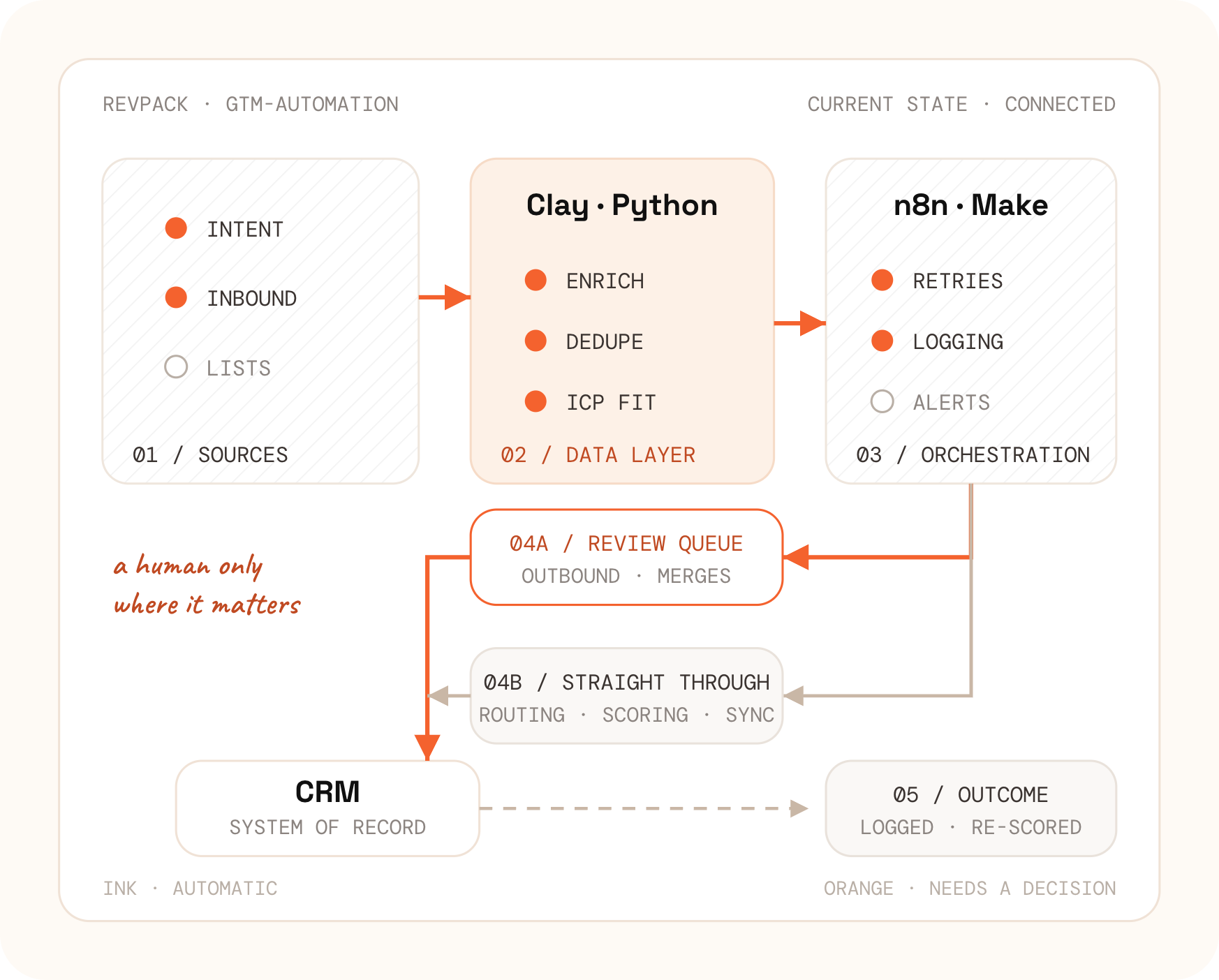
Budujemy automatyzację procesów sprzedaży, na których pracuje Twój zespół: uzupełnianie danych, usuwanie duplikatów, routing leadów, scoring i outbound. Narzędzie dobieramy do konkretnego zadania i podpinamy je do CRM, z którego już korzystasz.
Każdy proces oddajemy z przypisanym właścicielem, obsługą błędów i dashboardem. Gdy coś przestaje działać, od razu wiadomo, który krok zawiódł i dlaczego.
Dlaczego automatyzacje przestają działać
Większość problemów z automatyzacją nie wynika z narzędzia.
Cicha awaria
Krok trafia na limit zapytań i kończy się błędem, ale całe uruchomienie zostaje oznaczone jako zakończone. Nikt nie dostaje alertu, a rekord po prostu nigdy nie zostaje uzupełniony.
Duplikaty przy ponownym uruchomieniu
Brakuje klucza scalania, więc ten sam lead trafia do bazy dwa razy. Tak z czystego CRM robi się baza, z której nie da się zrobić sensownego raportu.
Koszty rosną, logika stoi w miejscu
Rozliczenie za każdą operację zderza się ze skalą uzupełniania danych. Rachunek rośnie razem z liczbą rekordów, choć sam proces pozostaje ten sam.
Brak wersji, brak wycofania zmian
Ktoś w piątek zmienia działający proces. Nie ma porównania zmian ani akceptacji — w poniedziałek widać tylko skutek.
Co automatyzujemy w procesie sprzedaży
Sześć rodzin procesów, zaprojektowanych tak, by dało się je utrzymać.
Większość działa bez udziału człowieka. Osoba wkracza tylko tam, gdzie błędna decyzja kosztowałaby Cię klienta albo reputację domeny.
Kaskady uzupełniania danych
Kolejność dostawców ustawiona według kosztu i skuteczności, zapisane wyniki, pokrycie raportowane dla każdego pola, a nie dla dostawcy.
Usuwanie duplikatów i higiena danych
Reguły dopasowania, zasady scalania rekordów i lista kwarantanny. Przy jednoznacznych dopasowaniach dzieje się to automatycznie, a gdy scalenie budzi wątpliwości, rekord czeka na akceptację.
Routing leadów i pilnowanie SLA
Reguły terytorialne, podział rotacyjny i limity obłożenia, mierzony czas do pierwszego kontaktu oraz ścieżka eskalacji. Działa bez ingerencji.
Scoring i ryzyko w pipeline
Dopasowanie i gotowość do zakupu oceniamy osobno, a wynik przeliczamy przy każdym nowym sygnale. Składowe oceny są widoczne na rekordzie, więc handlowiec może z nią podyskutować.
Outbound i pisanie wiadomości przez AI — z kolejką do akceptacji
To jedyne miejsce, w którym upieramy się przy człowieku: wszystko, co wychodzi z Twojej domeny, musi najpierw zostać zaakceptowane, poprawione albo odrzucone. Cała reszta aż do wysłania dzieje się automatycznie.
Zobacz pełny opis Signal Engine →Monitoring i alerty
Logi uruchomień, alerty o błędach na Slacku i dashboard jakości danych, który wskazuje konkretny zepsuty krok, a nie ogólne wrażenie, że coś nie gra.
Akceptacja ma sens tam, gdzie pomyłka dużo kosztuje: przy wiadomościach wychodzących, scalaniu rekordów, usuwaniu danych i wszystkim, co widzi klient. Routing leadów, scoring, synchronizacja i uzupełnianie danych działają bez nadzoru — po to właśnie je automatyzujemy.
Które narzędzie do automatyzacji wybrać
Clay, n8n, Make, Zapier albo Python
Każde z nich gdzieś sprawdza się najlepiej. Wybieramy pod konkretny proces, a nie pod umowę partnerską — i chętnie zostawimy to, co już u Was działa.
Źródło: dziennik wdrożeń RevPack 2025–2026 · Metoda: wybór narzędzia osobno dla każdego procesu · Ograniczenia dostawców sprawdzamy ponownie przy każdym projekcie
Automatyzacja w HubSpot, Salesforce, Pipedrive i Attio
Każdy CRM automatyzuje się inaczej. I to jest większość pracy.
Sama logika jest przenośna. Zmienia się krok zapisu: model danych, budżet zapytań API, zakres tego, co widzi silnik wbudowany w CRM, i to, co dzieje się, gdy ten sam rekord przyjdzie dwa razy.
Co da się w ogóle zapisać
Obiekty własne, powiązania i pola wymagane różnią się między systemami i między planami. To, co tu jest jednym obiektem, tam bywa trzema.
Limity kształtują projekt
Limity i operacje zbiorcze przesądzają, czy zapisujemy paczkami, czy rekord po rekordzie. Zignoruj je, a rozwiązanie zadziała w teście i polegnie przy prawdziwym ruchu.
Co zostaje w CRM
Część logiki musi zostać tam, gdzie mogą ją utrzymywać administratorzy. Część trzeba wyprowadzić na zewnątrz — dla rozgałęzień, ponownych prób albo wywołań zewnętrznych usług.
Co robi drugi zapis
Klucze scalania, sposób łączenia rekordów i to, czy historia przeżyje. Ta jedna różnica decyduje, czy ponowne uruchomienie jest nieszkodliwe, czy destrukcyjne.
Zmiana CRM nie oznacza budowania automatyzacji od nowa. Ponieważ logika żyje poza CRM, migracja podmienia krok zapisu i mapę pól, a nie same procesy.
Zobacz wdrożenia i migracje CRM →Wybrane realizacje
Co przebudowaliśmy i po co
Uzupełnianie danych i kierowanie leadów od nowa
Kaskada uzupełniania danych zastąpiła odpytywanie jednego dostawcy, a kierowanie leadów przenieśliśmy z wbudowanych procesów CRM do pipeline’u z logami i ponownymi próbami.
Usuwanie duplikatów i porządek w CRM
Najpierw spisaliśmy reguły dopasowania i zasady scalania rekordów, dopiero potem je zautomatyzowaliśmy — człowiekowi zostały tylko przypadki niejednoznaczne.
Outbound oparty na sygnałach
Sygnały zakupowe trafiły do jednego rejestru, do każdego z nich powstawał projekt wiadomości, a każdą wysyłkę handlowiec akceptował przed nadaniem.
Liczby z tych projektów wstrzymujemy do czasu zgody klientów. Publikujemy wynik tylko wtedy, gdy mamy zgodę, wielkość próby i opis metody — zapytaj na rozmowie, a przejdziemy przez nie razem.
Jak zaczynamy
Najpierw dowód, że działa. Stała współpraca dopiero wtedy, gdy się sprawdziło.
Audyt automatyzacji
Spisujemy każdą istniejącą automatyzację: czego dotyka, ile kosztuje i w jaki sposób się psuje. Dokument zostaje u Ciebie niezależnie od tego, co dalej.
Wdrożenie pilotażowe
Jeden proces, zrobiony porządnie, działający na produkcji, z obsługą błędów i dashboardem. Wycena w godzinach, nie w etapach.
Stała współpraca albo fractional GTM engineering
Bieżąca budowa i utrzymanie albo inżynier pracujący w Twoim zespole, na Waszych narzędziach i według Waszych zasad akceptacji zmian.
Zakres i koszt wyceniamy po audycie, pod Wasz zestaw narzędzi — wolimy podać prawdziwą liczbę niż tę z cennika.
Nasze teksty
Przeczytaj dwa i oceń sposób myślenia
Każdy z nich to rozpracowany problem, a nie lista punktów.
Częste pytania
Automatyzacja GTM bez owijania w bawełnę.
Czy wszystko musi być zatwierdzane przez człowieka?
Nie. Kierowanie leadów, scoring, uzupełnianie danych i synchronizacja działają same — po to je automatyzujemy. Człowieka wstawiamy tylko tam, gdzie pomyłka dużo kosztuje: przy wiadomościach wychodzących, scalaniu rekordów, usuwaniu danych i wszystkim, co widzi klient.
Czy Clay jest lepszy od Zapiera do automatyzacji GTM?
Do uzupełniania danych i researchu tak — Clay obsługuje kaskady dostawców natywnie. Do orkiestracji z ponownymi próbami i kontrolą wersji żaden z nich nie jest odpowiedzią: to zadanie dla n8n, Make albo własnego kodu. Zapier pozostaje przydatny do drobnych, mało ryzykownych połączeń.
Pracujemy już na Zapierze i Make. Wyrzucicie je?
Tylko tam, gdzie są przyczyną awarii. Audyt wymienia każdą automatyzację i mówi wprost: przenieść, napisać od nowa albo zostawić w spokoju. Sporo z nich zostaje dokładnie tak, jak jest.
Ile kosztuje automatyzacja GTM?
Zależy od tego, ile procesów prowadzicie i jak bardzo są zepsute, dlatego wyceniamy po audycie zamiast publikować liczbę. Abonamenty za narzędzia i zużycie modeli językowych rozliczają ich dostawcy, nie my.
Czy nasz zespół utrzyma to po Waszym odejściu?
Na tym polega nasz standard dostarczenia: wyeksportowane i opisane procesy, właściciel przypisany do każdego z nich oraz instrukcja obsługi ze scenariuszami awarii. Przekazujemy całość, a potem zostajemy dostępni na stałej współpracy, jeśli tego chcecie.
Zacznij od audytu automatyzacji, które już u siebie prowadzisz.
Dwa tygodnie, ustalony z góry zakres. Wychodzisz z opisem każdej automatyzacji, nazwanymi scenariuszami awarii i uporządkowaną kolejnością prac — niezależnie od tego, czy będziesz je budować z nami.